
ClonBrowser
  • Home
  • Solutions
    • Ad Verification
    • Affiliate Marketing
    • E-commerce
    • Social Media
  • Resources
    • Help Center
    • Blog
    • About Us
  • RPA Market
  • Price
  • Download
  • Get Started
  • EN
    • English
    • 中文(简)
  • Search
ZH
Facebook account enters safe mode

How to create multiple Facebook accounts

07/28/2021/in Account Management, All Articles /by Jolian

How to register multiple Facebook accounts

Steps to register multiple Facebook accounts

Step 1: Fill in the basic information and register

  • Name: It is the user name of Facebook. Friends can find you through it. It is recommended to fill in the real name, which can be modified once in 60 days.
  • Mobile number or email: Choose your frequently used account, which needs to be verified, so make sure that the phone number or email is authentic. After successful registration, you can change and add to the account settings.
  • Password: The password can be composed of numbers, letters, and characters. A complex password can improve the security of the account.
  • Basic information: birthday, gender, and other basic information about you.
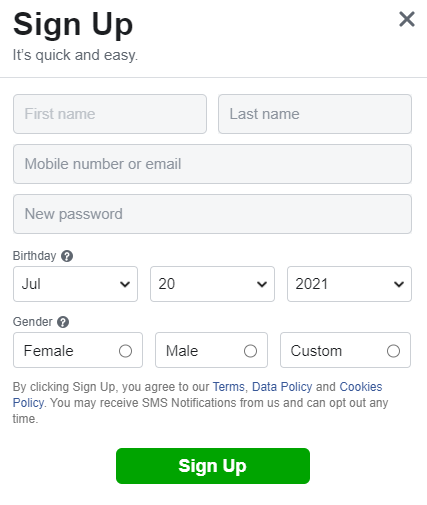
Register Facebook account

Step 2: Verify mobile phone number or email

The verification can be done on the webpage or on the mobile phone. A mobile phone number or email address can only be bound to one Facebook account. After verification, the Facebook account can be used normally.

Step 3: Log in to complete the information

After registering a Facebook account, you must keep account safe, and then complete the basic information after a period of time, such as uploading your avatar, adding friends, editing the profile, etc., and you can officially use the account after completion.

Precautions for registering multiple Facebook accounts

Facebook has very high requirements for registration. If you want to register multiple Facebook accounts without being restricted, you need to pay attention to a few points:

  1. Registering and logging in to a Facebook account requires a separate IP address. Generally, one IP can register up to 2-3 Facebook accounts. It is recommended that one IP corresponds to one Facebook account.
  2. Registering and logging in to a Facebook account requires a separate browser environment. Changing the browser will cause changes in the fingerprints for registration and login, causing account problems. It is recommended to configure a separate browser environment for each Facebook account.
  3. It is recommended to use the email registration first, whether it is verification or unblocking, the email is more convenient.
  4. Do not immediately create a homepage, add friends, or place advertisements for newly registered Facebook accounts.
  5. Do not add a large number of unfamiliar friends to newly registered Facebook accounts.
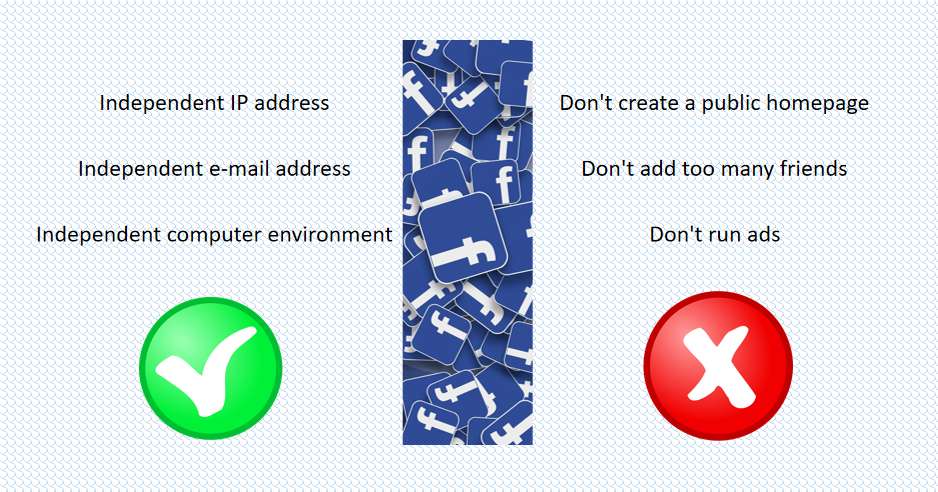
Key points for registering multiple Facebook accounts

Using clonbrowser, you can create a separate browser configuration, and configure different types of IP according to your needs, creating a completely independent browser and IP environment, so that you can achieve a browser environment + an independent IP to register a Facebook account.

How to keep multiple Facebook accounts safe

The newly registered Facebook account cannot do more for us immediately. In order to ensure the normal and safe use of the account, it is necessary to perform basic operations for a period of time after the account is created.

The main purpose of keep account safe is to make Facebook think that this account is normal and will not cause problems such as account banning.

What to do to keep account safe

  1. Keep your account online for 6-8 hours every day for at least one week. It is recommended to use clonbrowser, which allows multiple accounts to be online at the same time ensuring safety.
  2. One week after registration, you can start to improve some basic information and add some groups, but don’t add a large amount in a short time, but slowly accumulate.
  3. You can read more industry-related posts, like and comment appropriately, and post some simple posts.
  4. After two weeks, you can try to create your own public homepage and post some high-quality content. Don’t rush to promote products and links.
  5. The account has been operating stably for 2-3 weeks. At this time, you can do some paid promotion appropriately to let more people see you.
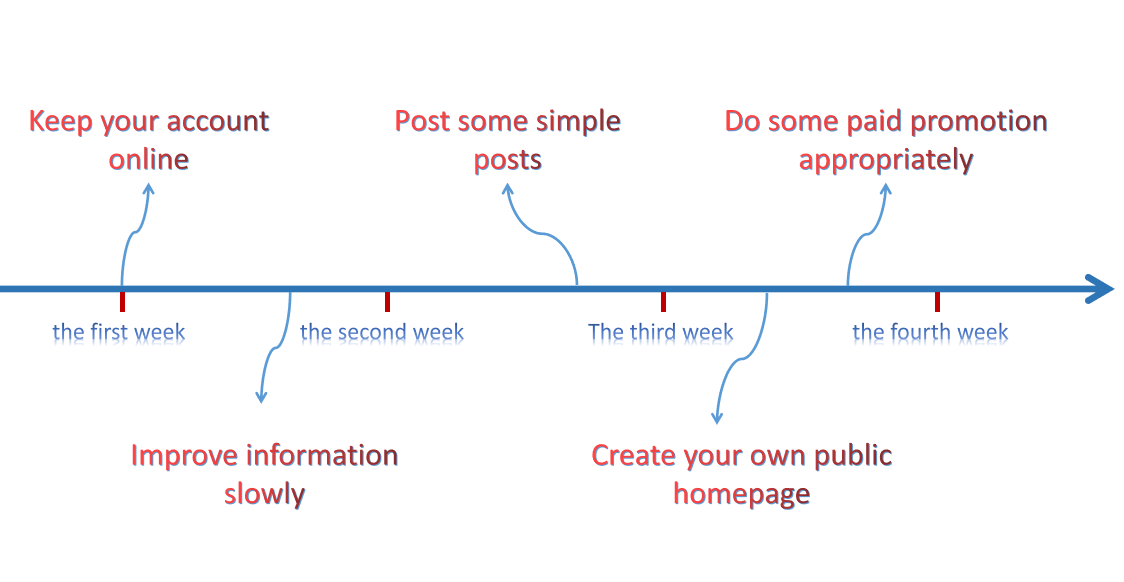
What to do to keep account safe

Under normal circumstances, it takes about a month to keep account safe, which may be extended according to the actual situation of the account, so be patient. The process of keep account safe is not complicated. It is important to use Facebook in the behavior of a normal user, not a marketer.

Precautions during keep account safe

  1. Do not log in and log out of your account frequently. The account must be kept online for a certain amount of time, otherwise, Facebook will think that the account is at risk and enter the safe mode.
  2. One person, one browser, one account. Multiple Facebook accounts must pay attention to anti-association. The account information, browser environment, and IP address must be completely independent and authentic.
  3. Do not add a large number of unfamiliar friends. Whether it is actively or passively, adding a large number of friends in a short time will cause Facebook’s suspicion, which is not a good thing.
  4. Don’t send a lot of messages. Sending a lot of spam (such as offers and promotional links) to users is not allowed by Facebook, which is a kind of harassment to users.
  5. Control your own behavioral scale. You can do something during the keep account safe, but pay attention to controlling the number of times.
  • Control the number of groups added.
  • Control the number of like Facebook pages.
  • Control the amount of content posted.
  1. Do not post sensitive content. If you post sensitive content such as violence, drugs, pornography, religion, race. Your account will be blocked.
  2. Do not use illegal tools. Many automatic tools can help us quickly complete some tasks (such as automatically adding friends, automatic replies, automatic comments, etc.), but these tools are not allowed by Facebook.

Facebook account enters safe mode

Facebook account enters safe mode

You may encounter a situation where the account enters the safe mode and prompts you to upload photos. There may be two reasons for this.

  • Random verification by Facebook to prevent bots from operating.
  • Some sensitive operations have been performed on the account that has just been registered.

In this case, just follow the instructions of Facebook.

  1. Upload photos that meet the requirements to Facebook.
  2. After uploading, do not operate the account frequently, wait 1-2 days to see if the account is approved.
  3. The uploaded photos are saved, there is a certain chance that there will be a second time to enter the safe mode.

https://admin.clonbrowser.net/wp-content/uploads/2021/07/Facebook-account-enters-safe-mode.jpg 550 811 Jolian https://admin.clonbrowser.net/wp-content/uploads/2025/05/ClonBrowser-zh-w.png Jolian2021-07-28 12:23:162024-02-29 15:32:04How to create multiple Facebook accounts
social accounts

How to manage multiple social accounts

02/23/2021/in Account Management, All Articles /by Jolian

Everyone has a lot of social media accounts. Because it is very troublesome to manage different social media accounts, social media marketing has become one of the most popular tools. Social media marketing tools require users to switch between different accounts and avoid bans, which is more convenient for individuals, but it is very inconvenient for business leaders to control dozens or hundreds of employees.

The social media market is very large, with many user groups. How can we rationally manage multiple social accounts? After screening, we found that some of these tools do not allow remote work in the team, and some tools do not provide the necessary level of security for users. In fact, many people have never considered services that include these aspects. In the end, we found the best way to manage multiple social media accounts, affiliate marketing and cloud management.

What is affiliate marketing?

Affiliate marketing, also known as network affiliate marketing, includes advertisers, affiliates, and affiliate marketing platforms. When users sell or advertise their products and services online, they use the services provided by the alliance to expand online and offline business, expand sales space and sales channels, and pay for new online marketing models based on actual marketing results. In other words, it is an online money-making method where users are promoting products, services, sites or businesses, and can earn commissions on each successful sale.

Under normal circumstances, different users will use multiple different accounts for work. In such a stressful situation, members need the best software to manage multiple social media accounts. We tell you a common example of a referral link that leads users to another site. If he purchases goods by clicking this link, the sharer will receive a commission for the purchase. In the end, a commission will be given to the sharer based on the number of clicks and guides and sales.

Or, there are other affiliate marketing options: users will be required to take action, such as registering, filling out forms, or leaving an email address. Or, it will provide users with a unique link to a specified product or service.

The amount of commission depends on the affiliate program itself. Some people will pay a certain percentage for sales, while others will pay a fixed fee for each conversion. In fact, we have many ways to track conversions, when someone uses a link with a unique code. It can be used to track the source of conversions. Perhaps a unique coupon code will be provided to the sharer, which can be used to provide it to other users.

What is cloud management?

Users work by creating and managing multiple accounts in the cloud, and do not have to sign a confidentiality agreement, because cloud management does not receive user account data. The user only needs to log in to the social media account once, and the saved session will be opened directly when logging in again.

When users are tired of transferring data from one device to another, cloud management will help users to switch between multiple accounts. Users can access from any device anywhere in the world. They only need to log in to the cloud-managed account, add the social media account that needs to be managed, and choose to accept authorization from different devices. Users can create multiple configuration files to log in on the specified platform, browser, operating system, geographic location and other parameters. And, the social network will think that the user is logged in from the same device.

Although some countries and regions prohibit access to the social network, because it will interfere with the advertising business. Users can use different services to unlock the lock, and only need to select another country in the configuration file settings to solve the problem.

How to manage multiple social accounts?

1.Facebook

We use Facebook as an example. Usually, users will go to search engines and find information about managing multiple accounts. Users can start using their personal accounts for the first time. However, when logging in to the account a certain time, the user found that the account was blocked for advertising rights due to suspicious activities or other reasons. It takes a week to get the release. When the account becomes invalid, the user can only register other new accounts.

Nowadays, Facebook managers are getting stricter and stricter. After the first potential customer enters the statistics, multiple accounts are banned. Many users can only bypass the anti-fraud system, because they need to obtain a large amount of traffic and transaction volume through conversion and powerful advertising cabinets.

In order to fight the anti-fraud system, affiliate marketers continue to form their own teams, prepare to release multiple profiles, and use multiple accounts to gain trust by imitating the operations of real users on the account.

Unfortunately, platform algorithms are constantly improving, and there is no 100% effective method: some people spend a lot of time developing social media accounts, some use bank cards to pay, and some use advanced agents. But in fact, there is no need to use an agent at all, there are many options.

In addition to the IP address and other network data, Facebook can also receive information about the device, its characteristics, operating system, browser, the history of accessing other sites from the browser, and installed plug-ins, fonts, resolution device screens, etc.

This is the unique function of the system to distinguish between ordinary users and fraudsters, so as to prevent someone from maliciously bypassing the anti-fraud system and deceiving the platform, thereby defining certain behavior patterns. If a malicious act by a user is detected, the potential violator is blocked even before the rule is actually violated.

Simply put, Facebook uses a special identifier to track all user activities not only on the site itself, but also on the user’s operations on the network and information about its equipment.

But in fact, the affiliate network marketing platform has reached a cooperation with Germany to create a number of Facebook accounts with geographic locations in Germany, and will go through a three-day simulation period before launching, using agents and virtual cards. Ads will be placed, although they will owe a few hundred dollars in debt, but they will still give up the account, then register a new account, imitate and restart the ads in the same way.

Facebook’s algorithms can solve the problem of violations. They will study user agent data, and then conduct observation and analysis to automatically block ads. Since there are multiple accounts and fraudulent portraits have been formed, multiple personal data will soon be banned.

Therefore, users should try not to prepare only 2-3 accounts at a time, but at least 5-10 accounts, so that in the case of a large number of bans, there are still enough resources available for work. However, many users have technical resource problems. The first is the hardware, usually only a laptop, and perhaps a few phones, which means that the possibility of obtaining unbanned accounts and devices will gradually decrease, in order to avoid a large number of purchases on the market. Device, the user can try to create a virtual machine.

2.Google

From a technical point of view, managing multiple Google accounts is almost the same as using an anti-detection browser to manage multiple Facebook accounts. The main task of this browser is to replace different browser fingerprints. Users need to do this to hide personal data. The real device provided by the Google tracker, and completely unrelated different accounts are created from the same device. Merely buying a new hardware device to use it does not improve the problem, so Google will not prohibit users from using the same device.

Users who want to manage social accounts online can create a new Internet identity that has its own specific proxy and fingerprint settings. After closing and reopening the tab, these settings will be saved and work. Each such identity is isolated from each other. Moreover, data such as cache and cookies are also placed separately, and these data cannot reach from one identity to another, which can help you manage your account.

https://admin.clonbrowser.net/wp-content/uploads/2021/02/social-accounts.png 185 260 Jolian https://admin.clonbrowser.net/wp-content/uploads/2025/05/ClonBrowser-zh-w.png Jolian2021-02-23 14:41:462024-02-29 15:32:27How to manage multiple social accounts
Page 5 of 512345

英语

Let’s Talk

Services

  • Help Center
  • Official Blog
  • Pricing Strategy

Policies

  • Privacy Policy

Resources

  • Download Client

Contact Us

Telegram:@clonbrowser
Wechat: clonbrowser2022
clonbrowser
© 2019-2024 ClonBrowser CLOUND NEXUS ECOM SERVICE CO., Limited
津ICP备11001221号-24
Scroll to top