Tutorial | TikTok Account Matrix: A Common Strategy for Targeting Overseas Markets

TikTok’s account matrix has become a prevalent strategy for reaching international markets. But what advantages does it offer? Can operating multiple accounts lead to getting banned? How can you build an account matrix cost-effectively? This article reveals all!

What Are the Advantages of a TikTok Account Matrix?

Simply put, a TikTok account matrix involves operating multiple TikTok accounts together, which offers two main advantages:

1. Lower Risk During the Initial Phase

Due to the many factors affecting account traffic, most companies and users prefer to start with a matrix. If an account doesn’t show progress within a certain period, it is quickly discarded without additional investment.

2. Faster Growth During the Operational Phase

By segmenting accounts into specific content niches, it’s easier to achieve rapid fan growth. Data monitoring helps guide business development directions. The connectivity between different accounts under the same brand also promotes synergistic fan growth, increasing follower counts and making monetization faster and easier. Especially, when one account gains popularity, it can help newer accounts grow their following more quickly.

Methods for Setting Up a TikTok Account Matrix

There are several common methods for setting up an account matrix in the market today:

1. The Most Basic Method: Using Multiple Smartphones

This approach mimics real user operations but can be cost-prohibitive as managing a large number of smartphones requires significant time and effort. This is more suitable for fine-tuning operations in later stages.

Not willing to buy many smartphones? Then you might consider simulating multiple environments online, which can be achieved through cloud phones and fingerprint browsers.

2. Cloud Phone Systems

These allow you to simulate multiple smartphone environments on a single computer, which is convenient for managing multiple accounts but limited to mobile functions, making it less handy for team operations. Registering for cloud phone services can also be cumbersome.

3. Fingerprint Browsers

Thus, using fingerprint browsers offers the best cost-effectiveness for operating multiple accounts. Let’s see how ClonBrowser addresses the challenges of multi-account operation.

Advantages of Building an Account Matrix with ClonBrowser

Firstly, there are low hardware and labor costs. You can register via email and download the ClonBrowser client for use without needing to purchase numerous phones. The unique fingerprint browser environment and clean, stable proxy IPs help prevent tracking and association.
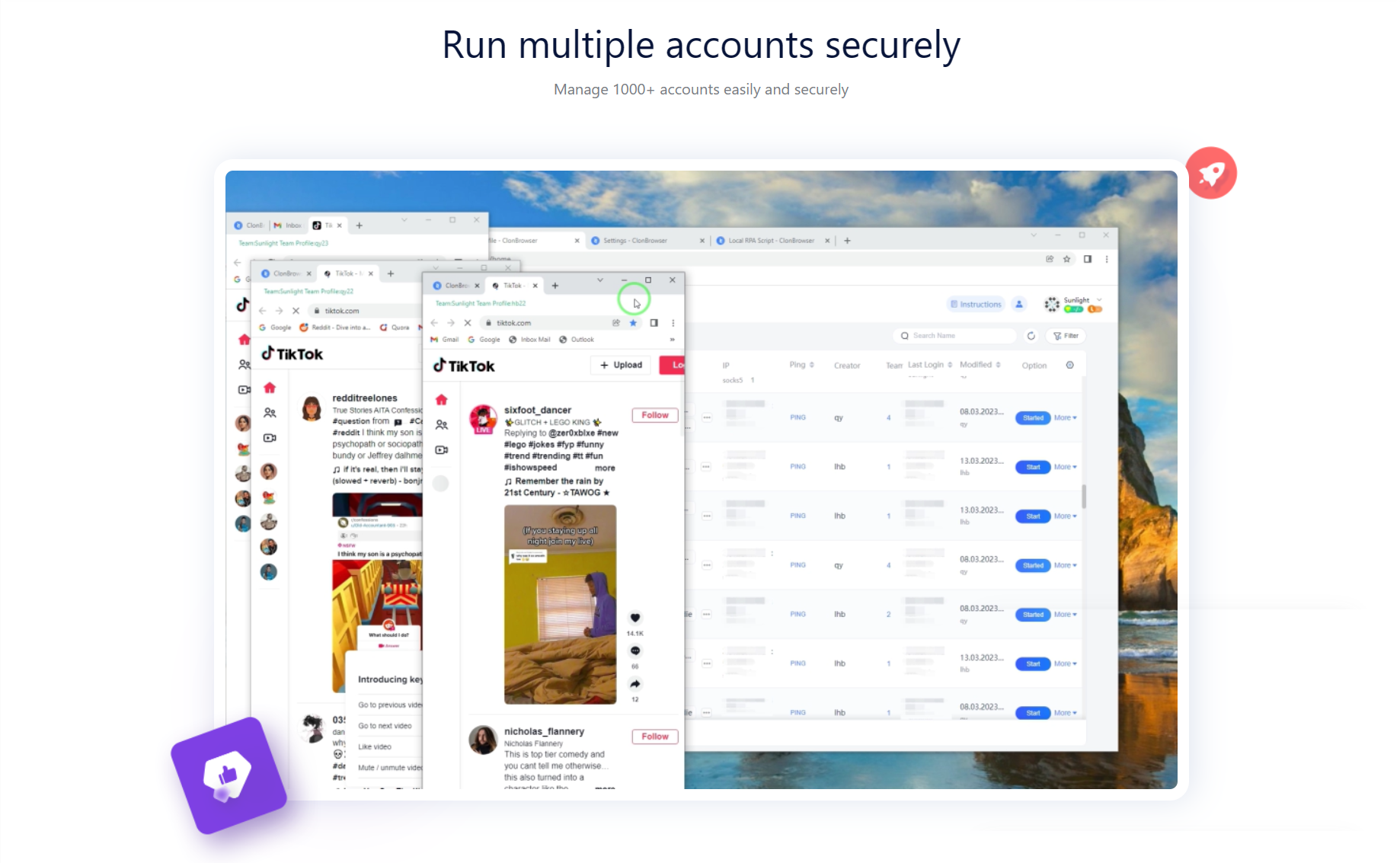
Platform accounts can be easily linked for convenient logins. Each browser environment can be quickly tied to accounts via a spreadsheet format, making it easy to manage even large numbers of accounts with features like notes and tags.

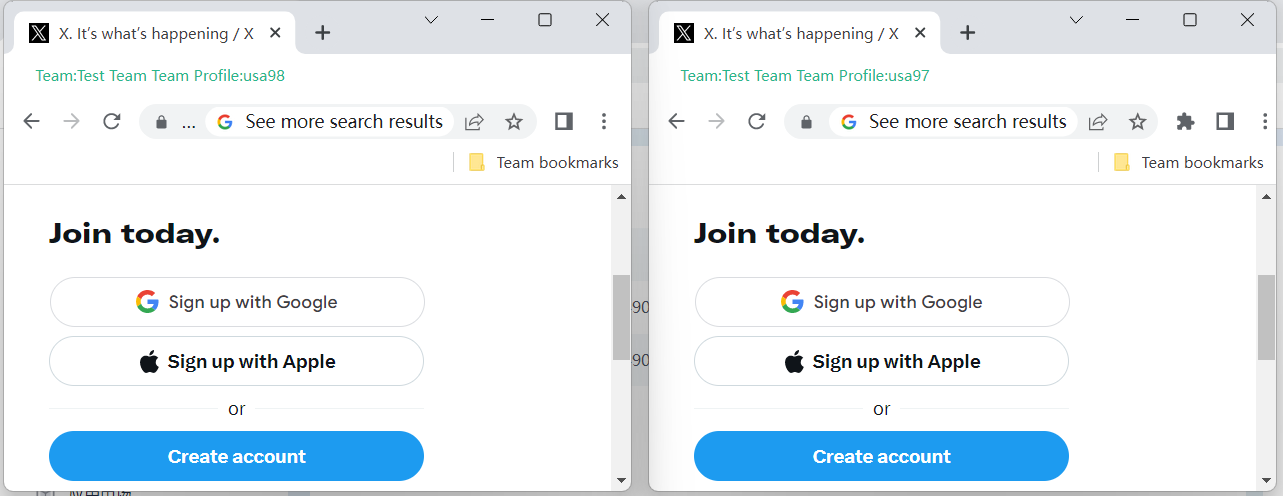
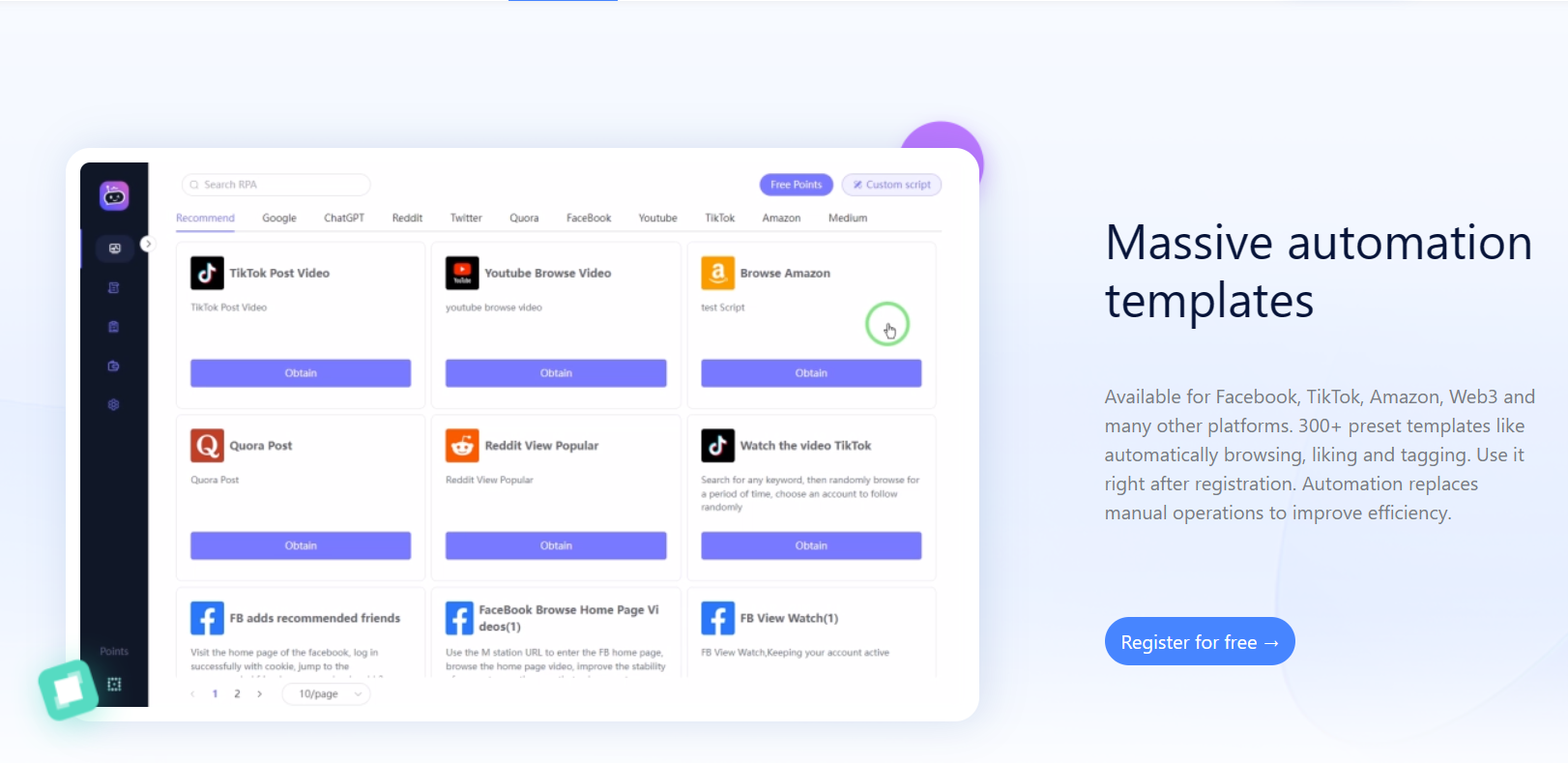
If you need to register multiple TikTok accounts via email, you can use Group Controls and window synchronization features for bulk operations. RPA (Robotic Process Automation) scripts can automate account nurturing and content creation, including video posting.
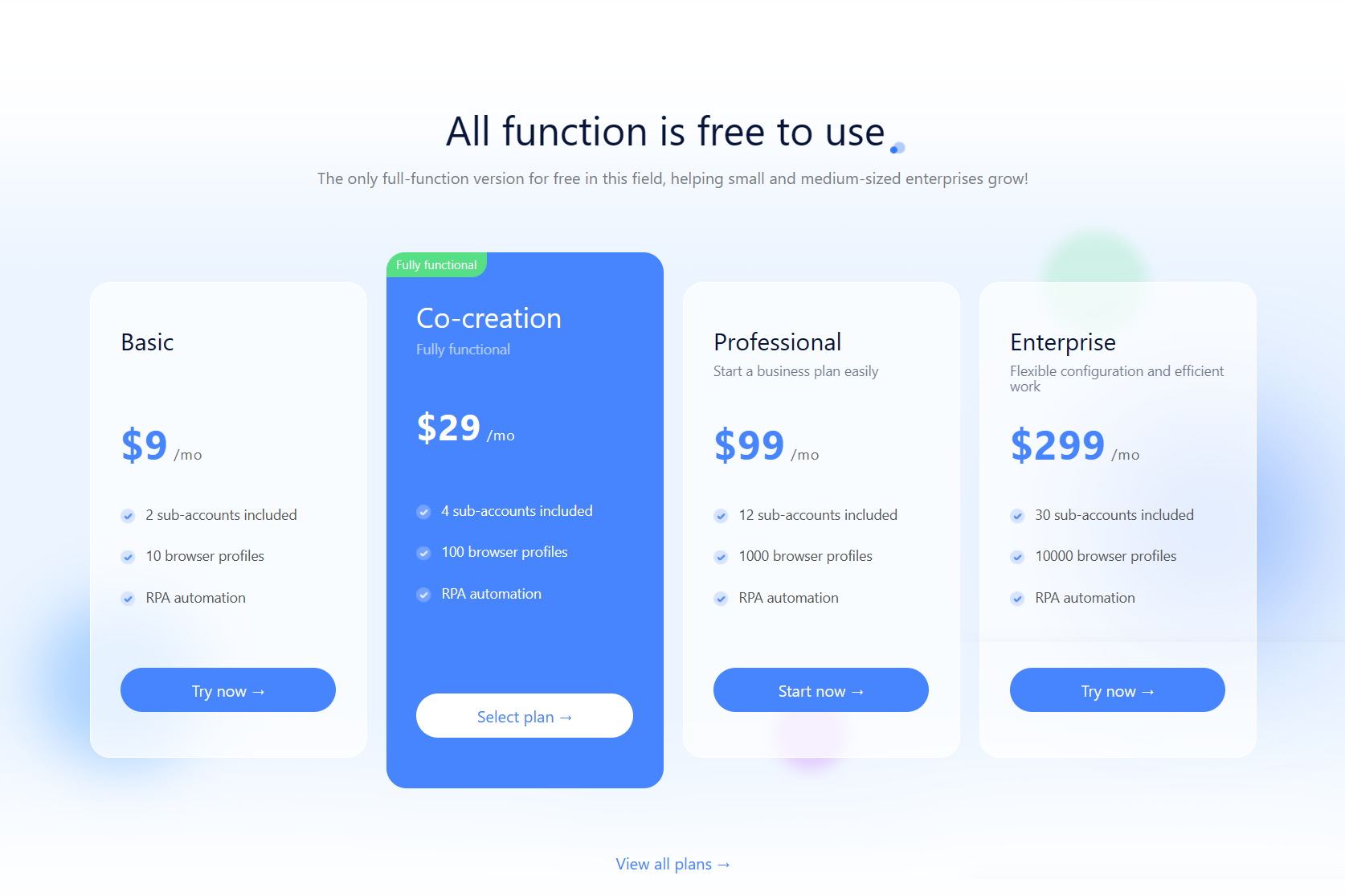
Secondly, ClonBrowser’s comprehensive team functionality ensures the security of account assets. The packages include sub-accounts (e.g., a co-creation version available for five users), allowing you to invite registered ClonBrowser team members to manage and distribute browser and certain permissions across different computers. Removed members will no longer have access to the account assets.

For mature accounts ready to start live streaming, the combination of a fingerprint browser and a real smartphone can ensure safe logins both on the client and mobile through local proxy features.

ClonBrowser offers three well-adjusted fingerprint modes for beginners and customizable settings for advanced users, making it highly adaptable.

This is the secret to building a TikTok account matrix—manage multiple account assets with ClonBrowser’s fingerprint browser!

Interested or have specific needs? Feel free to contact our customer service.

Tutorial | How to Maximizing Airdrops with ClonBrowser (3)

In the pursuit of maximizing airdrops, ClonBrowser Anti-detect Browser presents a series of articles to help Web3 users expand their reach, enhance operational efficiency, and reap greater profits.

In the last two articles we covered the basics of getting started with web3 jerking airdrops: the management and maintenance of the trio of Google Mail (Gmail), Twitter, and Discord accounts and how to use the Group Controls feature to do tasks in bulk. Today we’re going to cover installing extensions in the ClonBrowser browser, especially the wallet extension that is key to the web3 project.

In web3 projects, wallets are often used to interact, store and manage cryptocurrencies, and control the security of digital assets. Therefore, web3 players need to install the wallet plugin in their browsers for quick operation. For users with multiple accounts, installing extensions one by one is too cumbersome, and a one-click batch installation like ClonBrowser can save time and effort. Let’s take a look at how it works:

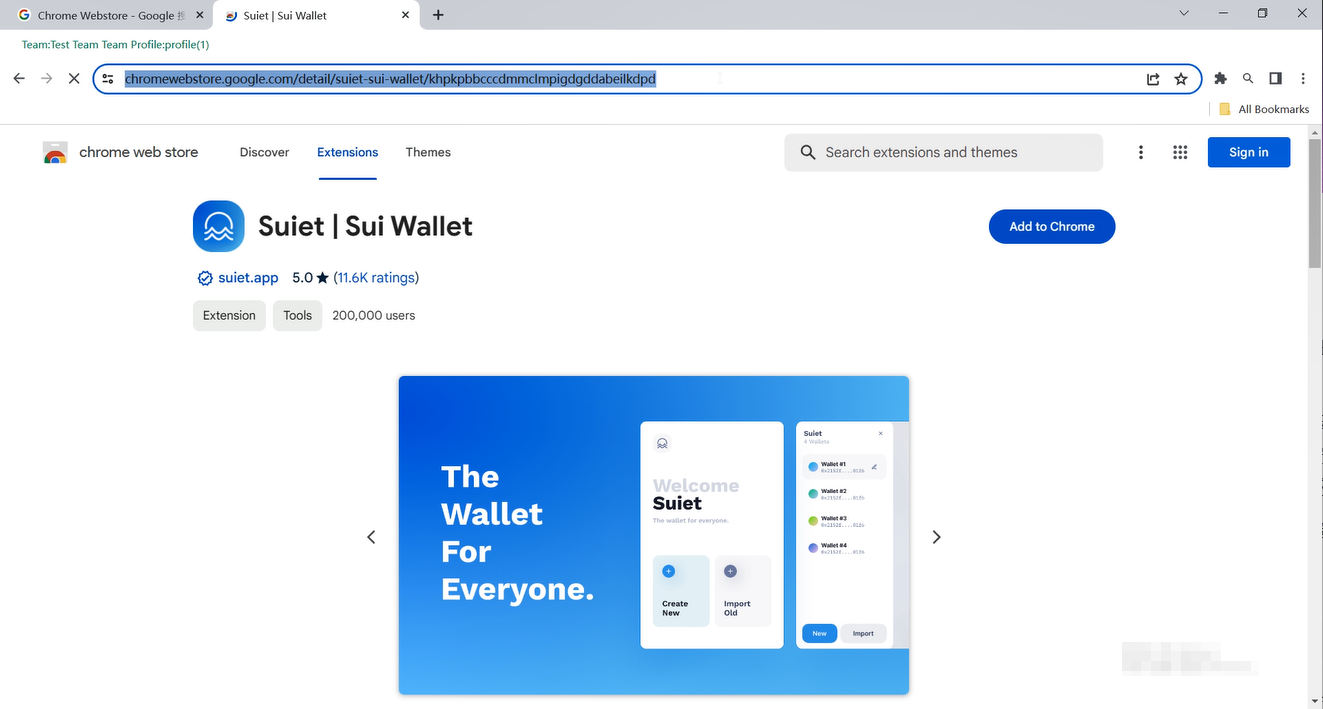
Firstly, head to the Chrome Webstore and choose the wallet extension you want. Let’s take Sui Wallet as an example. Copy the link of its page.

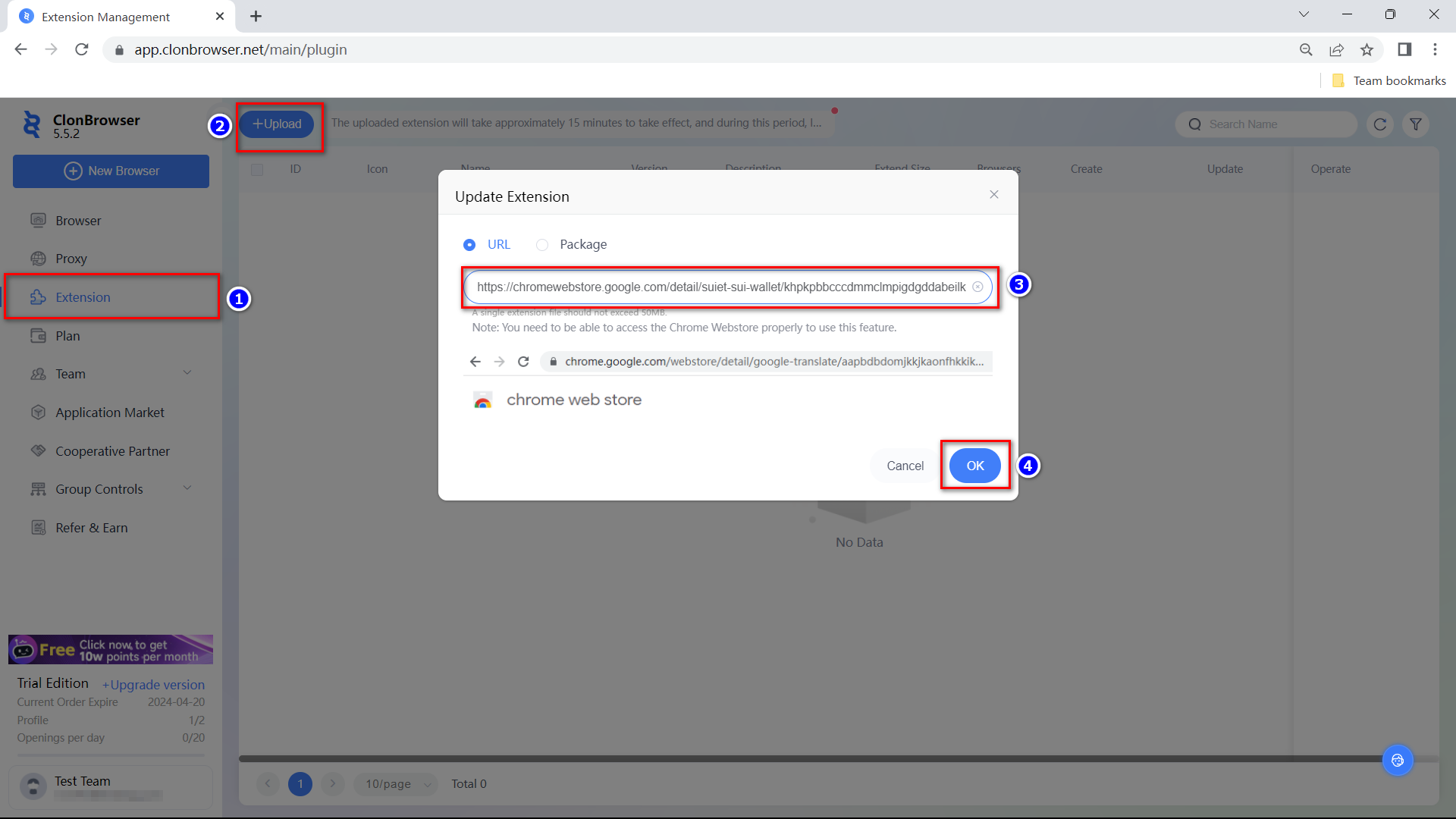
Go back to ClonBrowser, go to [Extension] – [Upload], paste the URL and click OK.
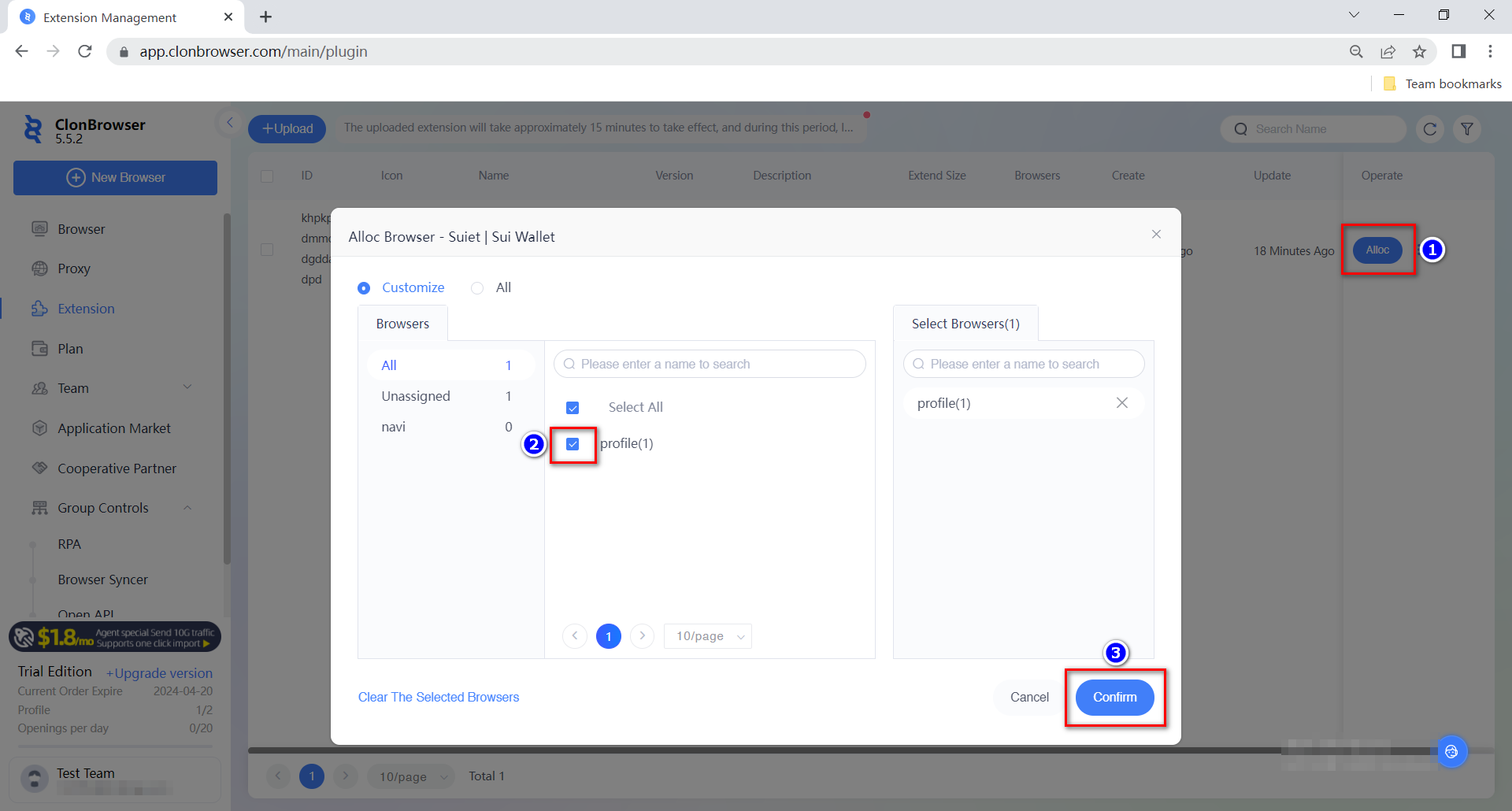
If you have your own install package you can also upload it. The uploaded extension will take effect within 15 minutes, during which time the startup browser will not refer to the latest extension. After the plugin has been uploaded, wait for it to take effect and assign the Sui Wallet extension to the desired profile browser.
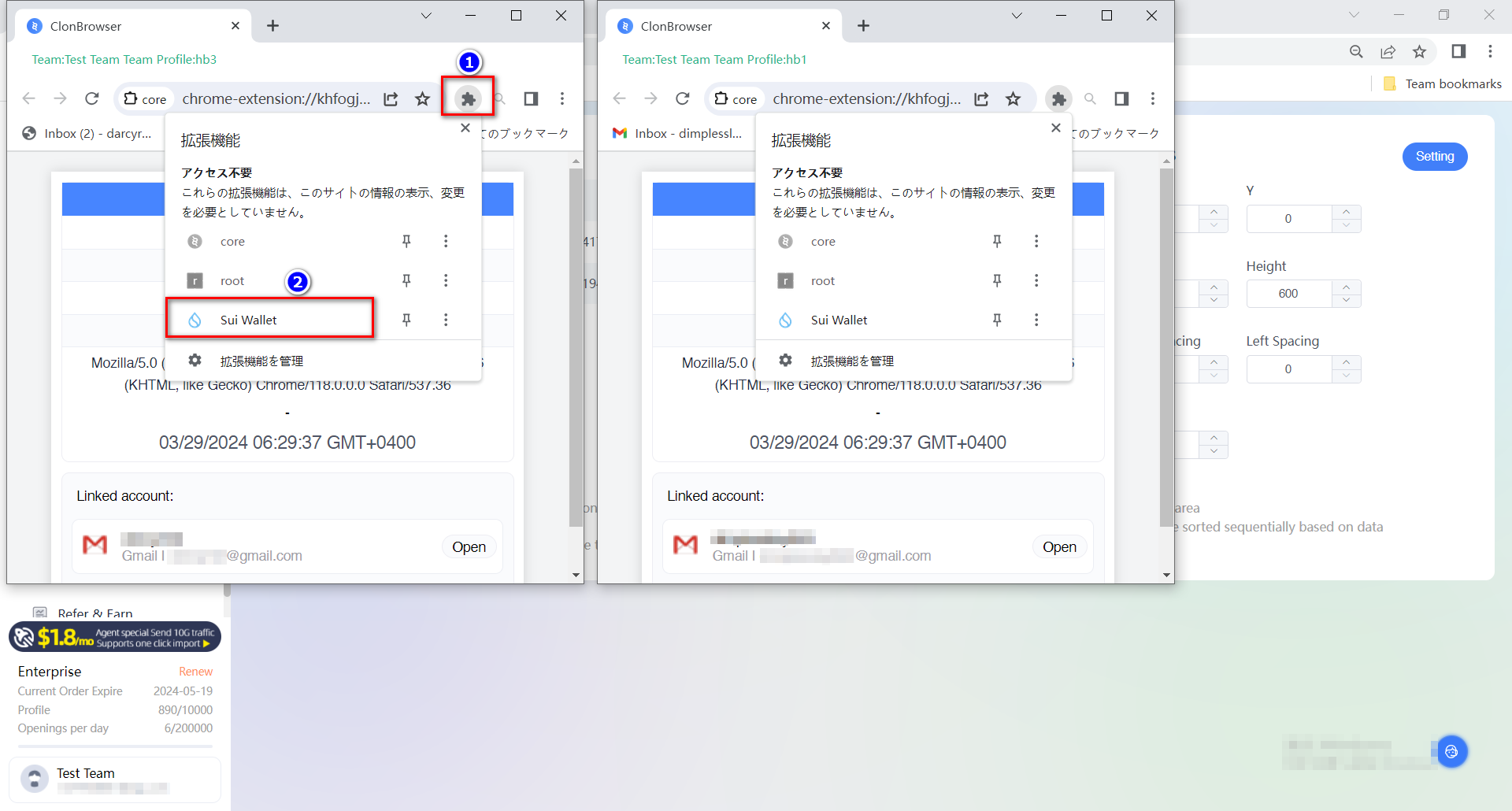
The wallet extension can be used synchronously after opening multiple browsers, and then with the window synchronisation function in the group control software, the batch airdrop operation is easy to handle. The specific operation of browser syncher can be referred to the previous article.

That’s all for now about ClonBrowser Anti-detect Browser play in web3 project. Feel free to share and communicate with us for more requirements and ideas!

Cast a wide net and reel in more fish. ClonBrowser, the anti-detect browser, is your essential tool for monetizing your Web3 ventures.

Tutorial | How to Maximizing Airdrops with ClonBrowser (2)

    In the pursuit of maximizing airdrops, ClonBrowser Anti-detect Browser presents a series of articles to help Web3 users expand their reach, enhance operational efficiency, and reap greater profits.

    In the last article, we will delve into the fundamental principles vital for successful Web3 airdrop campaigns: managing and maintaining the trio of Google Mail (Gmail), Twitter, and Discord accounts. It was also mentioned how to use the Group Controls feature for bulk registration. The purpose of multi-account management is to be able to airdrops in bulk. And in this article, we’re going to go further into how to use the Group Controls feature to operate airdrop missions in bulk.

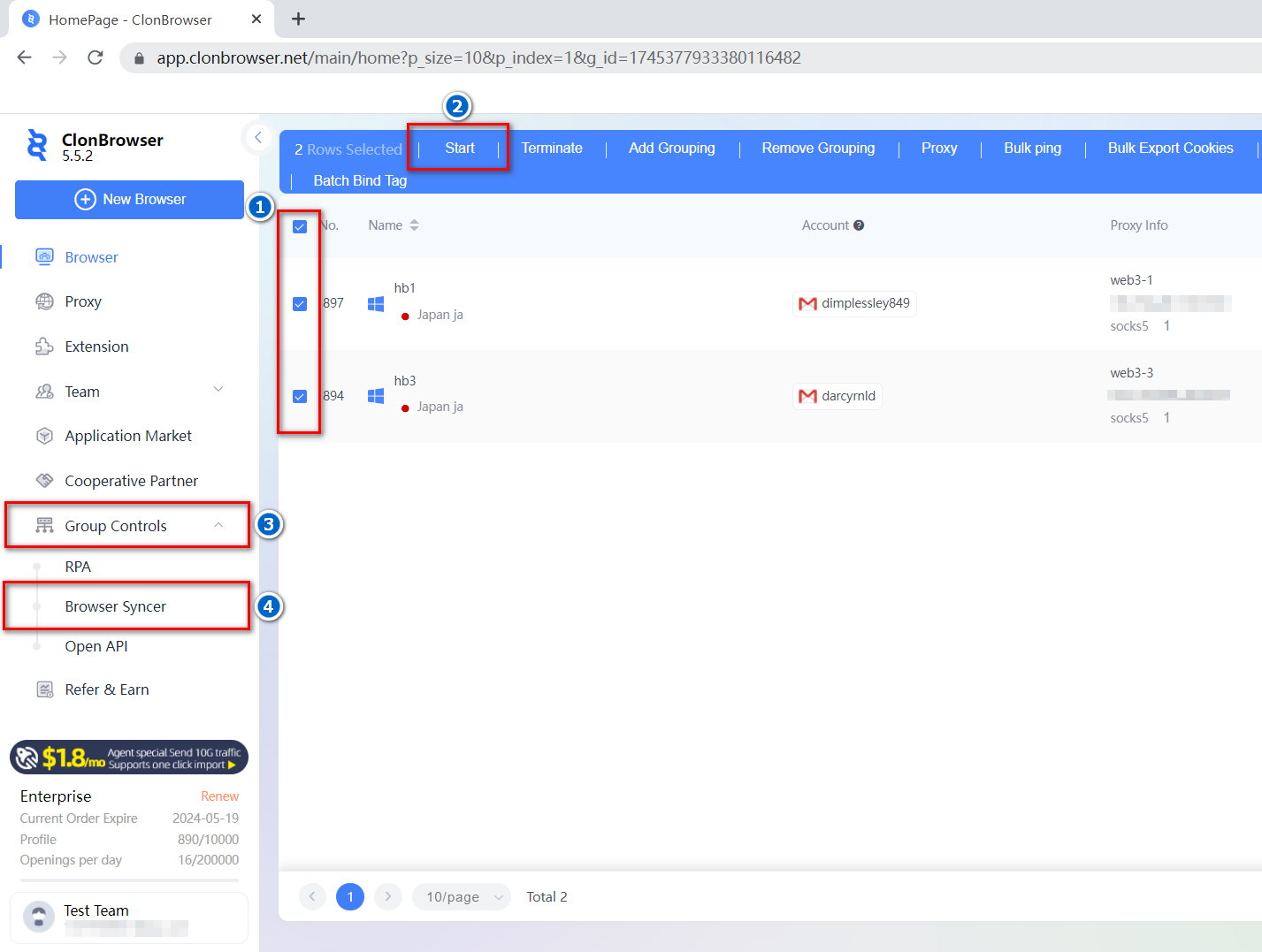
The first is the Browser Syncer function. You need to start 2 or more browser profiles, click [Group Controls] – [Browser Syncer].

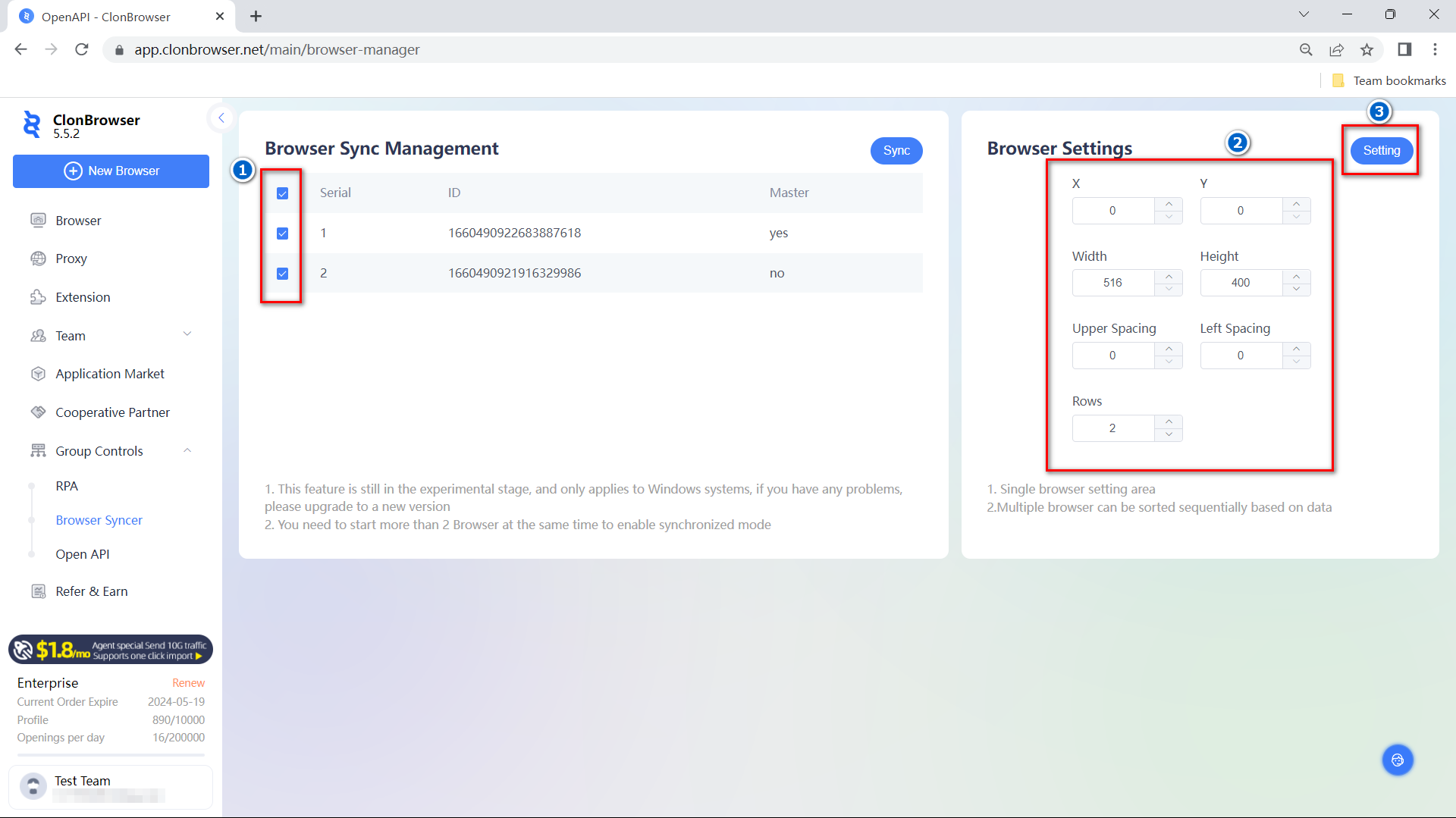
Select the browser and adjust the window settings first to arrange the browser into a formation that is convenient for you to operate.

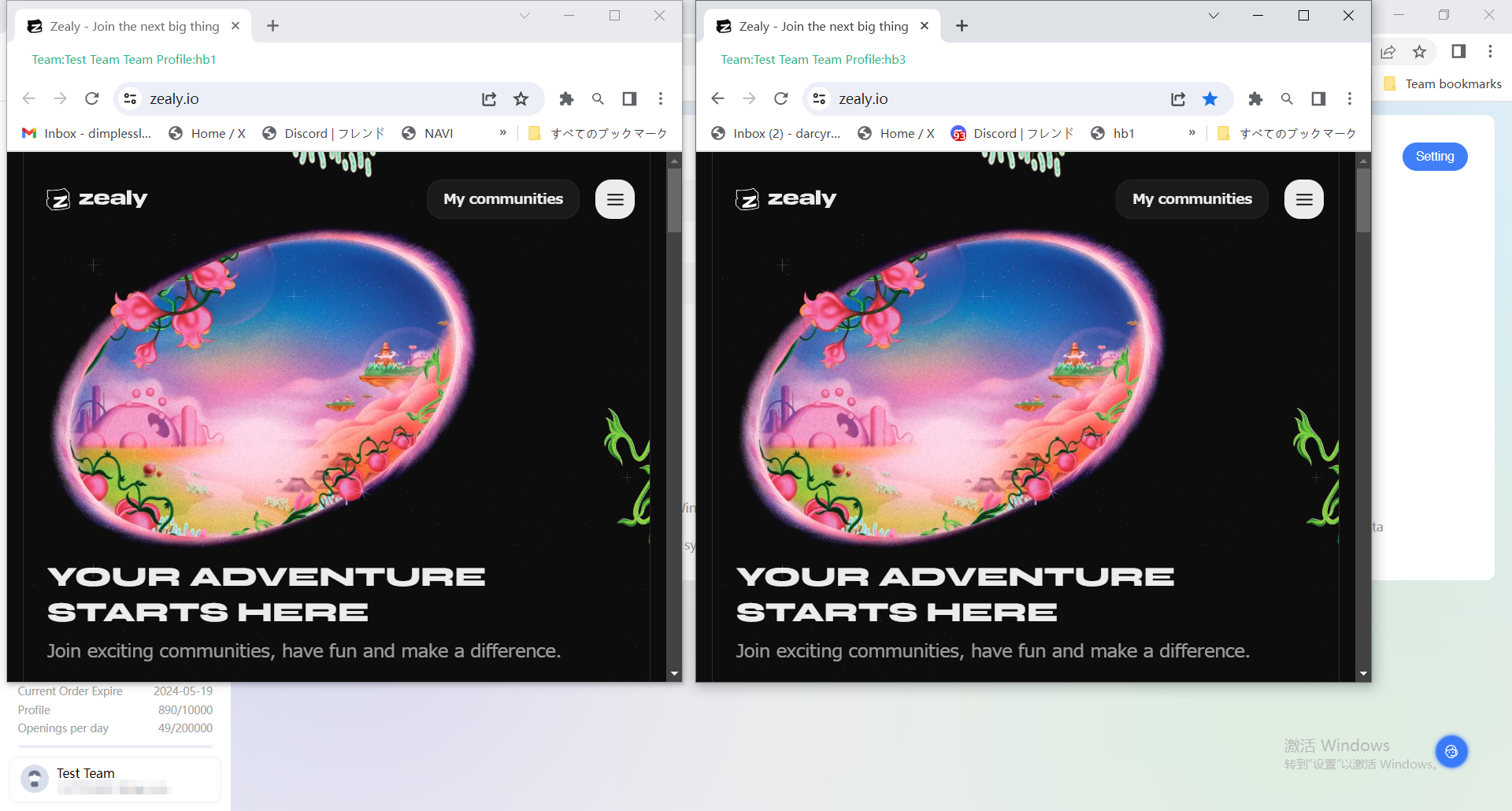
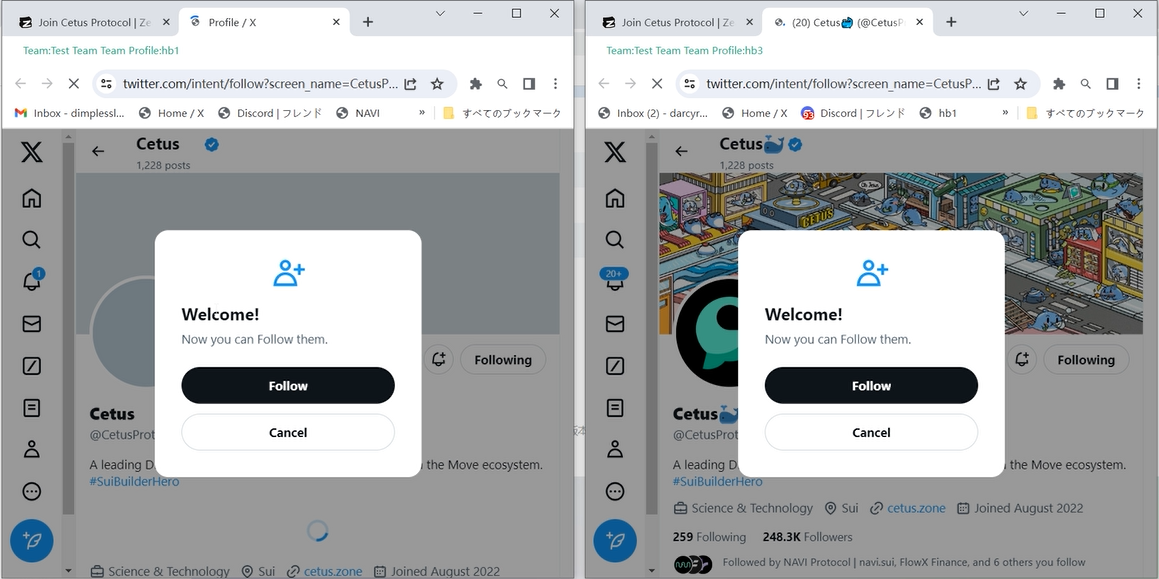
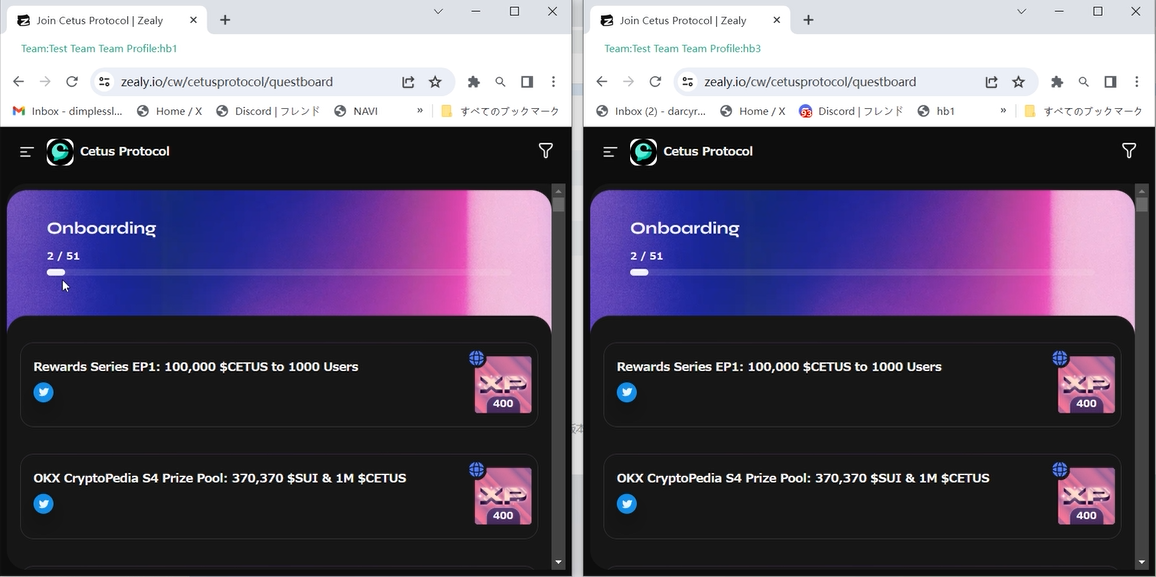
Click [Sync] after setting the browser size and layout. At this time in the upper left corner of the first main browser to operate, the other browsers will be synchronised. Enter the task platform, find the appropriate project to operate. During the synchronisation process, you can operate other browsers individually, only the operation of the main browser will be synchronised with the rest of the windows.

Since we have set up the trio of Google Mail (Gmail), Twitter, and Discord accounts for each browser in the last tutorial, it opens smoothly when doing tasks in bulk. It is evident that the maintenance of the trio of Gmail, Twitter, and Discord accounts is indispensable. In the same way you can register and maintain accounts for more platforms as needed.

You can see the points when the task is completed. Batch synchronised operation saves more energy and time.

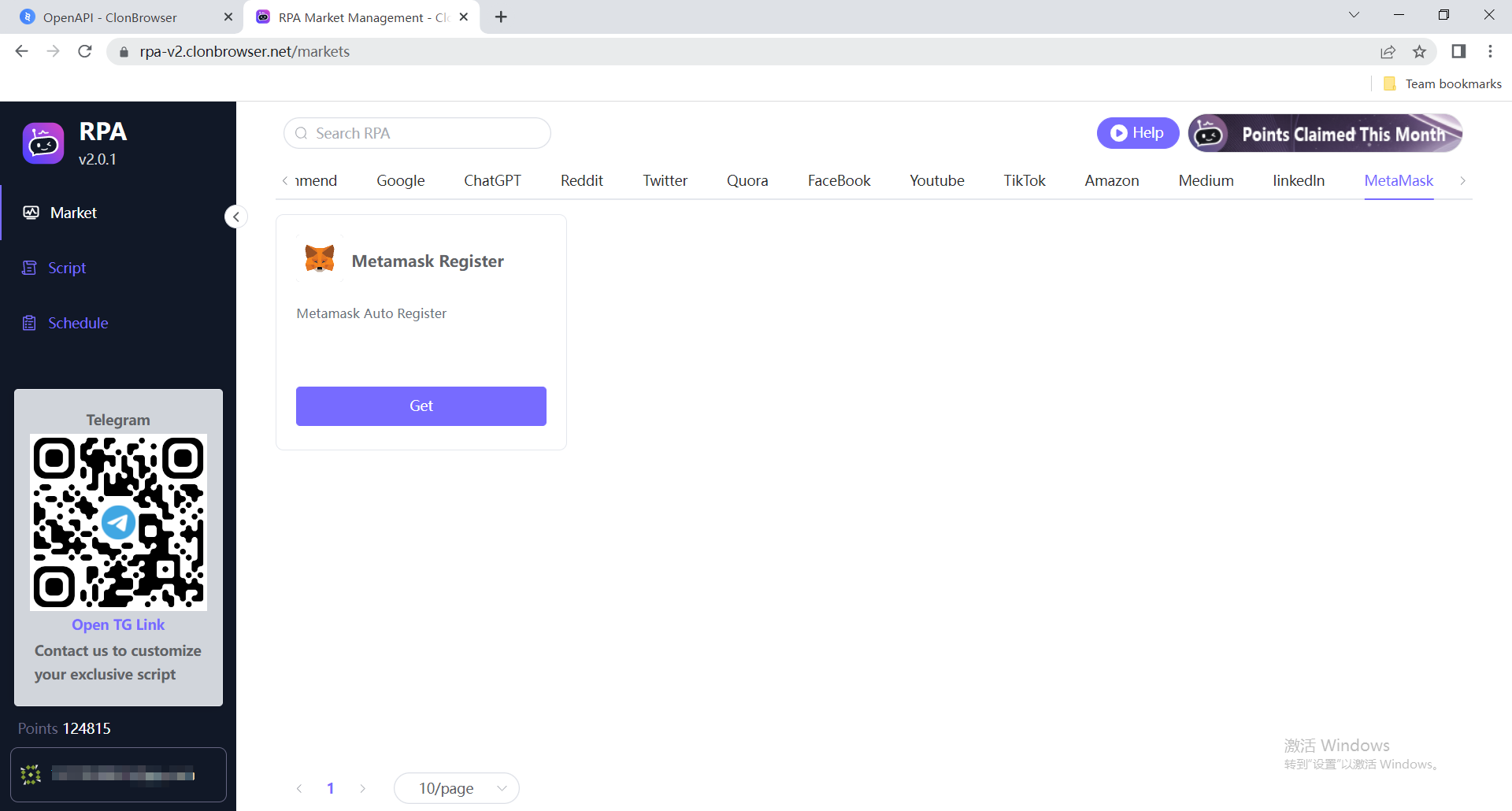
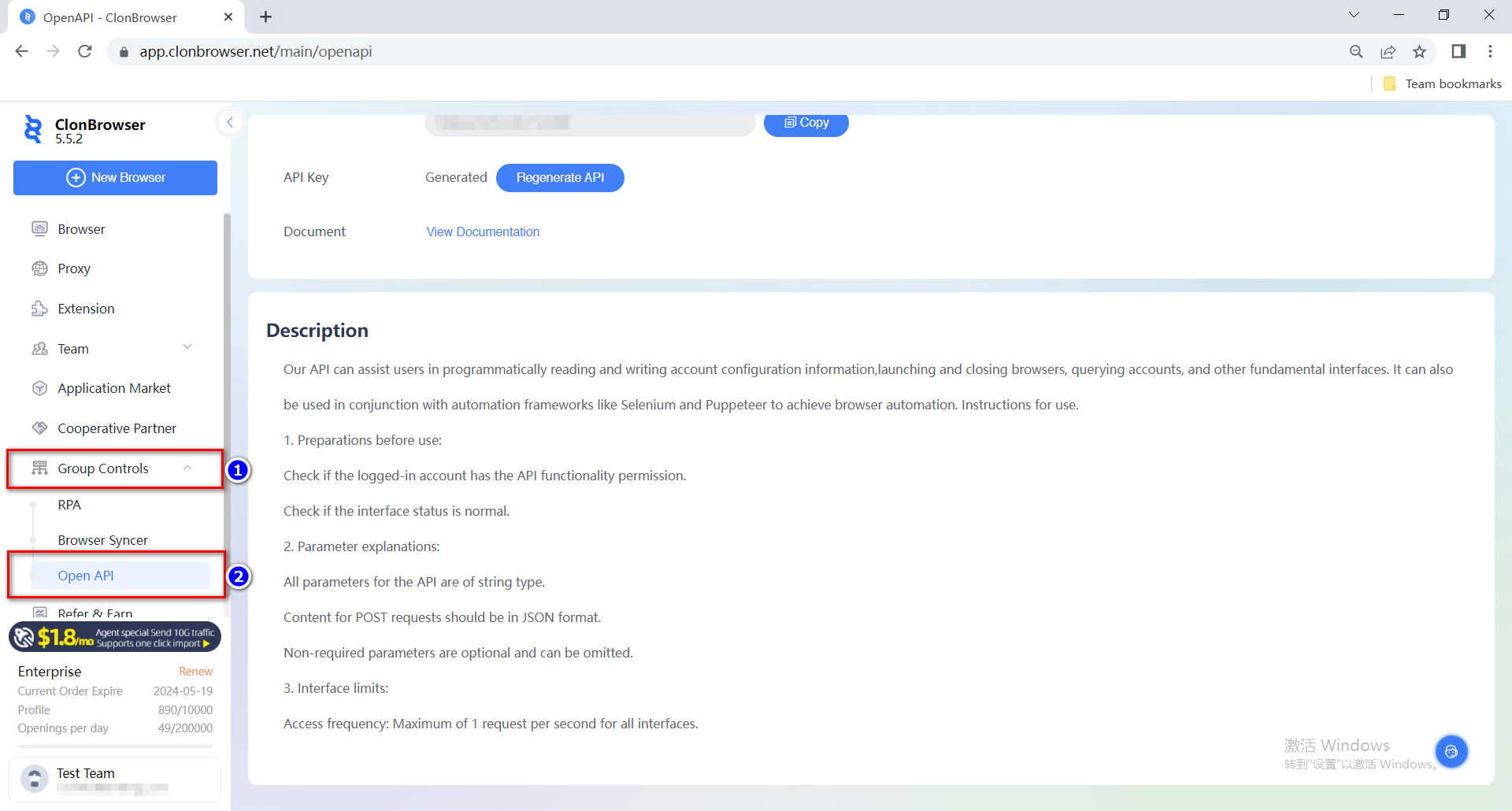
This is the Browser Syncer feature in Group Controls. There are also RPA automation scripts and Open API in the Group Controls module. RPA scripts can be customised, you can consult customer service to customise your scripts. There is also an Open API interface to give you more room for manoeuvre. You can find more information in the Help Centre.

In the next article we will cover installing plugins in ClonBrowser, especially the wallet plugin which is key in web3 projects.

Cast a wide net and reel in more fish. ClonBrowser, the anti-detect browser, is your essential tool for monetizing your Web3 ventures.

Tutorial | How to Maximizing Airdrops with ClonBrowser (1)

    In the pursuit of maximizing airdrops, ClonBrowser Anti-detect Browser presents a series of articles to help Web3 users expand their reach, enhance operational efficiency, and reap greater profits.

    Today, we will delve into the fundamental principles vital for successful Web3 airdrop campaigns: managing and maintaining the trio of Google Mail (Gmail), Twitter, and Discord accounts.

    The trio refers to the accounts on Gmail, Twitter, and Discord platforms. Gmail is utilized for registering accounts on other platforms and receiving verification information from Web3 projects. Twitter keeps users updated on project announcements and provides insights curated by influential figures. Discord serves as a platform for account verification by project teams and the execution of Web3 tasks. These three accounts act as the identity proof for Web3 users engaging in airdrop operations. To conduct a larger number of airdrop campaigns, it is essential to possess multiple sets of the trio. As the Web3 community continues to grow, the number of accounts increases exponentially. In such a scenario, having stable and active accounts for the trio becomes crucial for airdrop operations.

    However, managing a large number of accounts and passwords and keeping them active can be a challenge. This is where ClonBrowser Fingerprint Browser comes in. Let’s explore the methods it employs to achieve these four effects.

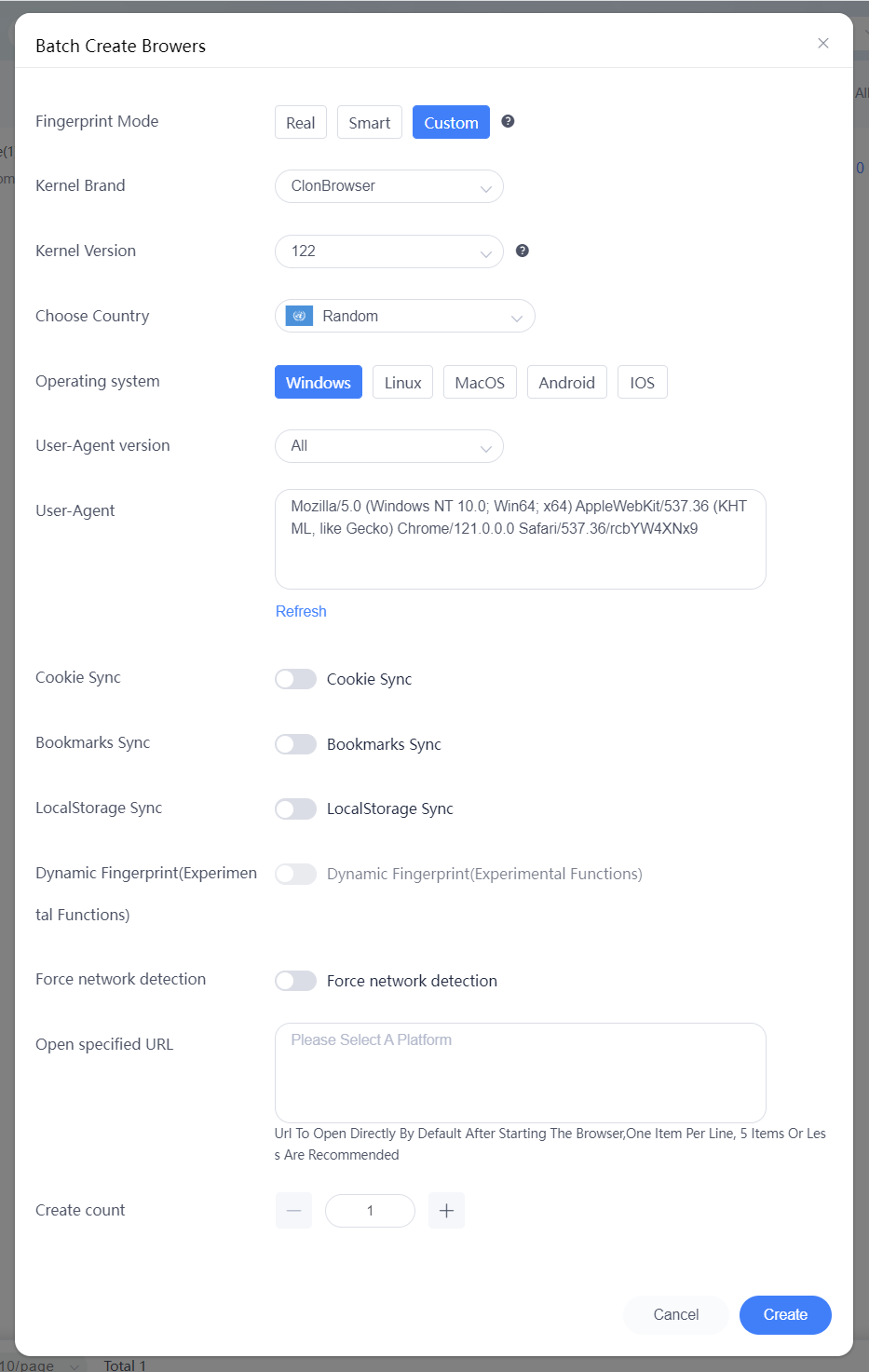
    Firstly, batch creation of profiles. In ClonBrowser, open the [Browser] page and click on [Batch Creation]. You can also create profiles individually by clicking on [New Browser] following the same process. Choose the [Custom Mode] for enhanced flexibility. Then select the kernel version. Our latest version is based on Chromium Stable Version 122, and you can choose according to your requirements. Next, select the operating system. You can also enable sync settings for convenient operations across multiple devices. Finally, open the specified URL. Based on your usage habits, you can input frequently used Web3 airdrop task platforms, allowing direct access during each profile launch.

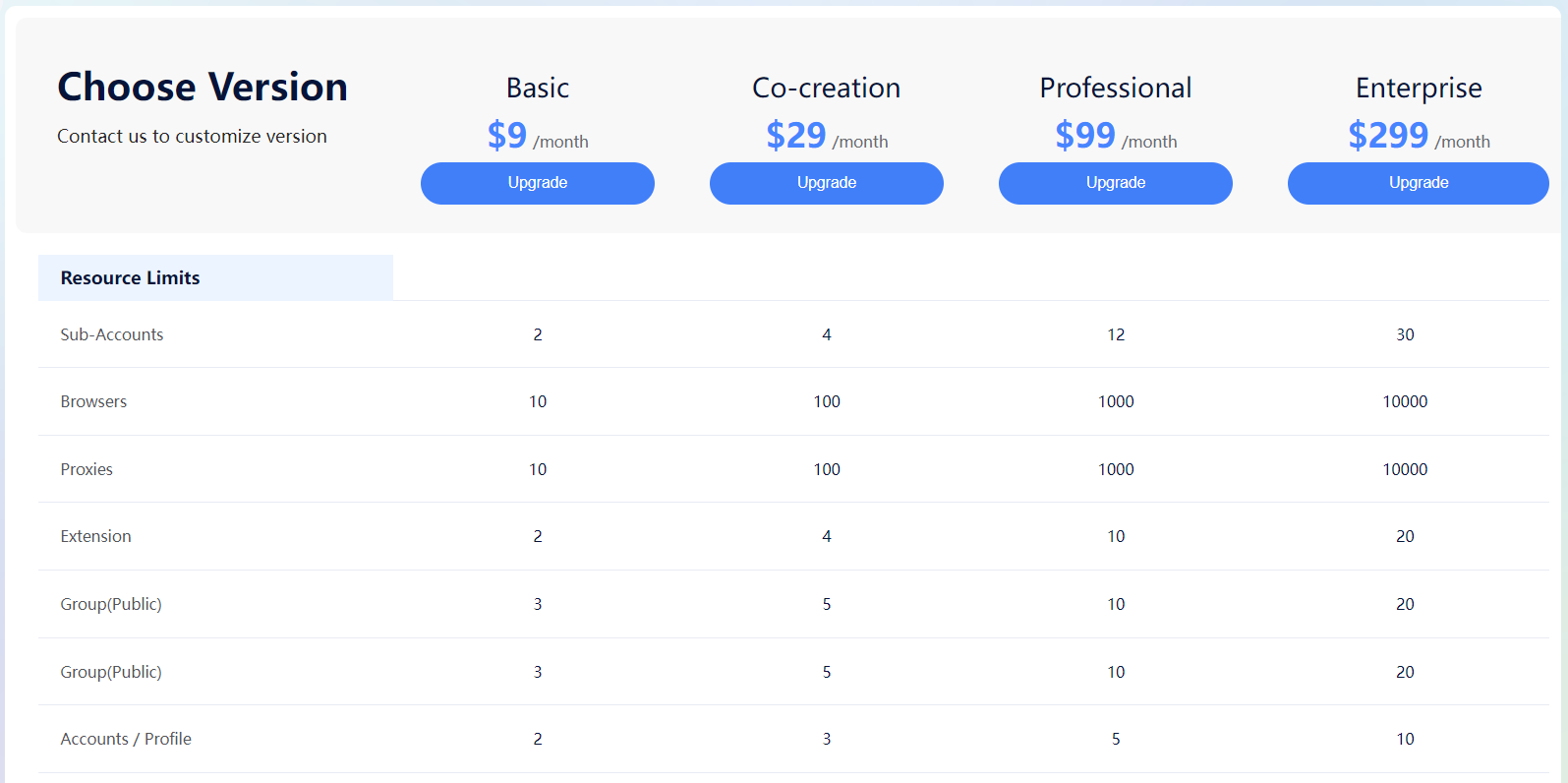
    Next, select the number of profiles to create. The free trial version of ClonBrowser allows the creation of two profiles. The Basic version ($9) allows the creation of ten profiles, while the Co-creation version ($29) allows the creation of 100 profiles. There are also larger-scale versions available for selection. If you have created a large number of profiles, grouping them based on usage requirements will facilitate management.
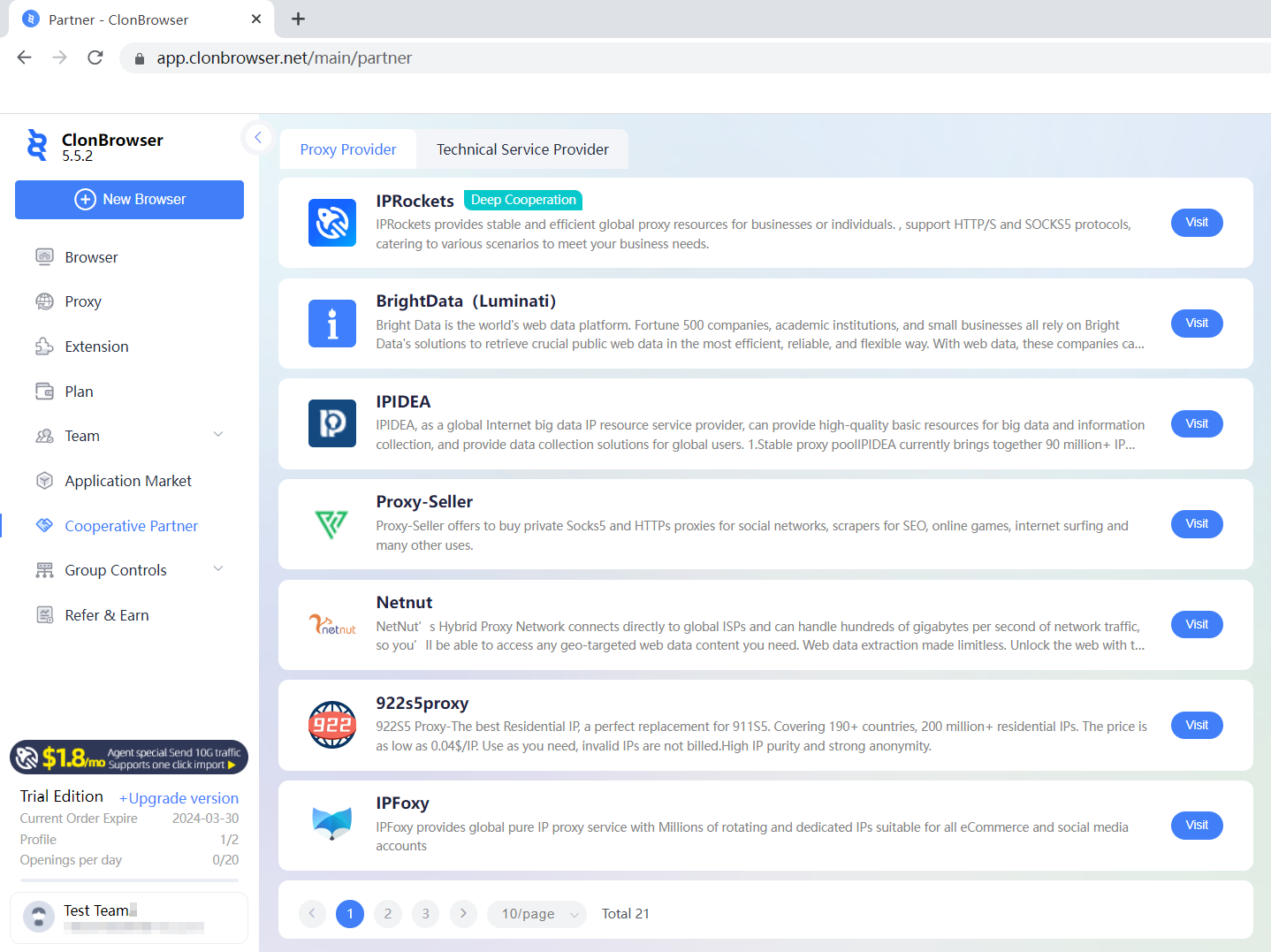
    Once the profiles are created, it is necessary to set up proxy IP. For small-scale projects, proxy settings may not be necessary, and you can directly use the local proxy for operations. However, for large-scale projects, to avoid account suspension while registering accounts on multiple platforms, clean and stable proxies are required. Therefore, we need to add proxies. If you don’t have proxies, you can choose proxy service providers from our [Cooperative Partners]. IPRockets is our trusted partner for proxy services, offering unlimited traffic and bandwidth services, providing you with peace of mind and convenience. After purchasing proxies from IPRockets, you can import them into ClonBrowser with a single click. If you are using proxies from other service providers, you can add them through the [Batch] import proxy function.

    Similar to profiles, grouping a large number of proxies with profiles allows for easier management. Then, return to the [Browser] page and click on [Set Proxy]. This way, the browser profile is complete, and each profile has an independent environment with protected data.

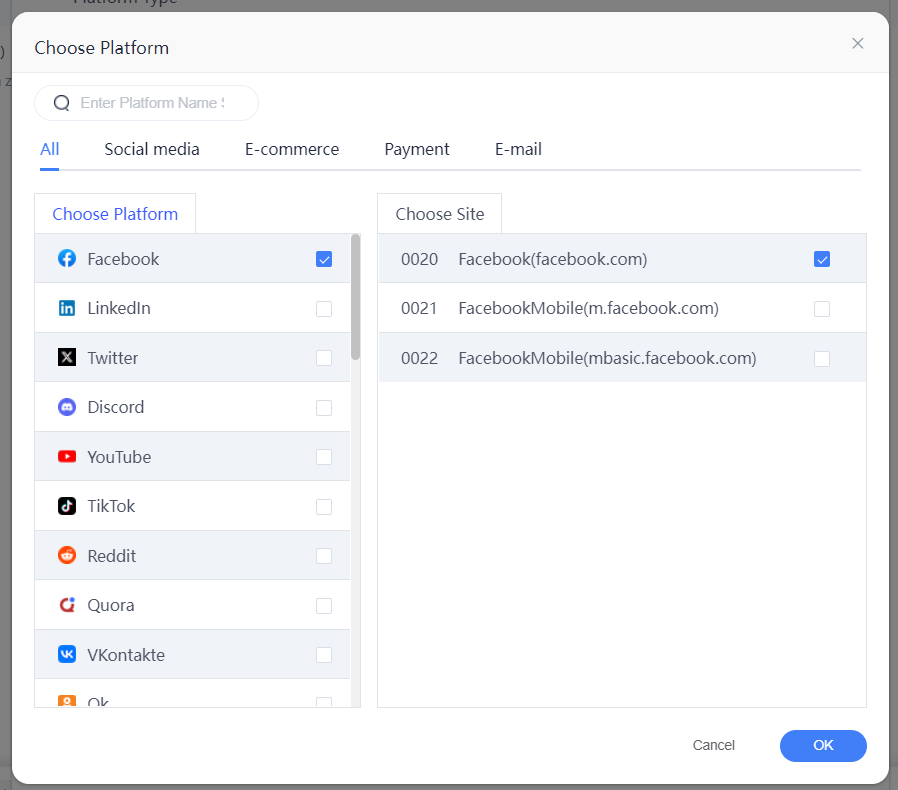
    Next, let’s set up the account information for the trio. Select the profiles in batch, click on [Export Templates] – [System Platform Account], and choose the corresponding platform. You can directly select Gmail, Twitter, or Discord from the list. If it’s a web3 platform that is not listed, choose [Custom Platform Account] during the export and enter the corresponding website URL.

    Taking Gmail as an example, after exporting the template, enter the login information. Pay attention: It’s recommended to have an auxiliary email for Gmail to facilitate verification and recovery. You can place the auxiliary email in the alias for easier management. Once the information is entered, save the file and click on [Batch Import] to upload it.

    Platform accounts can also be added individually during subsequent usage. Click on Customize Display Column, check [Account], and save. This way, you can directly see the account binding status in the displayed columns, and you can click on the plus sign to add new accounts.


Once the account information for the trio is added, the profiles are considered set up, and you can automatically log in without having to manually enter the account credentials in the future.

    Furthermore, you can utilize our group control feature for batch registration. Start by opening two or more profiles and click on [Group Controls] – [Browser Syncer]. Adjust the windows as needed and perform operations in the main profile located in the top-left corner. The other profiles will sync the operations accordingly. This will improve operational efficiency.

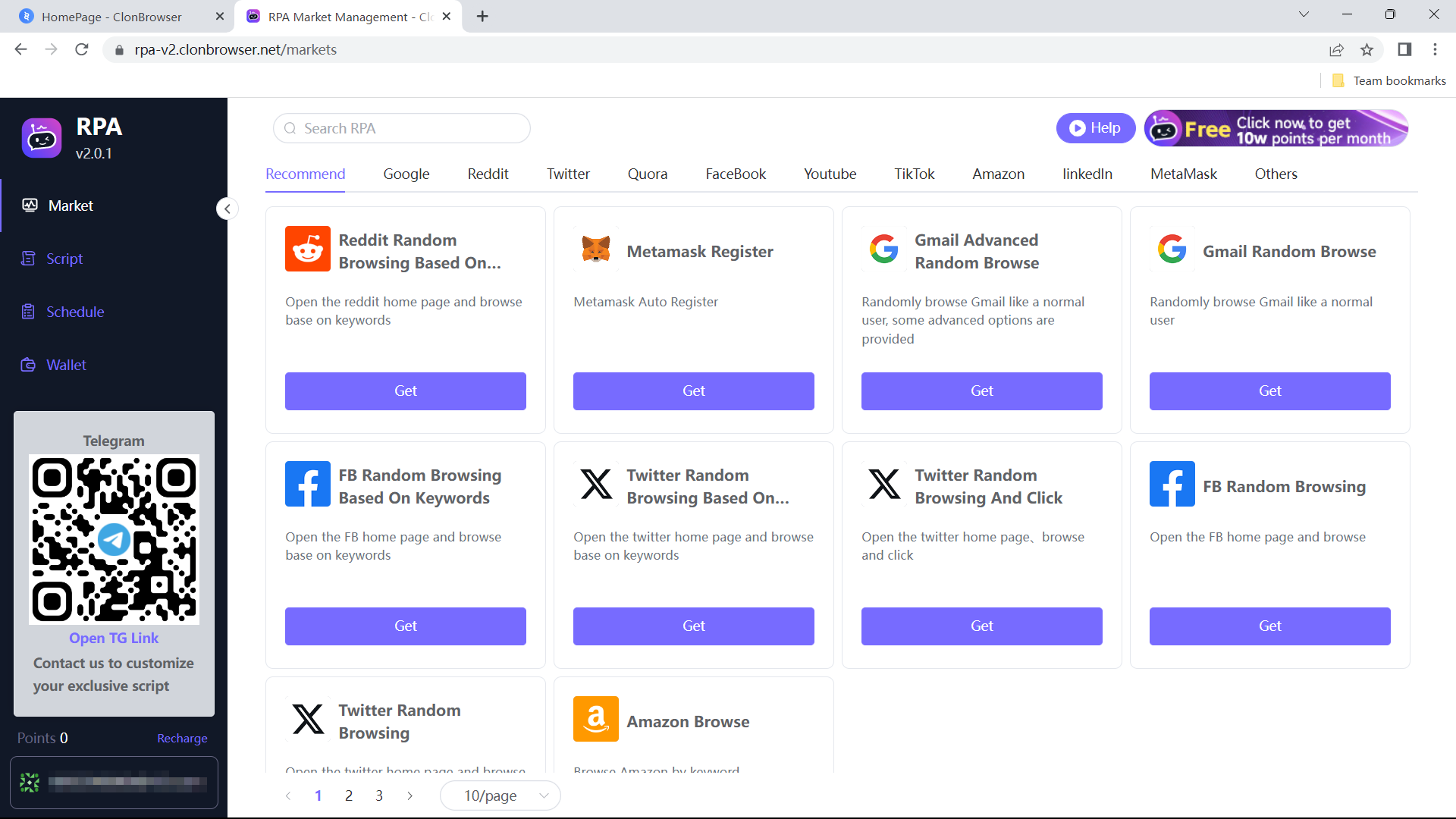
    However, the process is not yet complete! The trio requires regular browsing to maintain activity, and this is where RPA (Robotic Process Automation) scripts come in handy for performing large-scale operations. Click on [Group Control] – [RPA]. First, select the desired script from the [Market], such as “Gmail View Mailbox,” and click on [Get]. Each browsing script completed for an account will generate a screenshot, which you can check in the designated folder to detect any account anomalies. Before saving the script, you can [Debug Run] to see if it meets your requirements. After clicking [Save], you will see the script on the [Scripts] page. Click on [New Schedule]. Fill in the plan name, select the script to execute, and the browser. Choose the execution time for the plan. You can select “Loop Execution” to have the script run periodically. After clicking [Save], the plan will execute according to the set parameters.

    You can check the execution status of the plans on the [Schedule] page. And for repetitive plans, you can clone them without the need for reconfiguration. On the [Wallet] page, you can check the points consumed by each schedule execution. If you have further requirements or inquiries about the scripts, you can directly contact the staff for assistance.

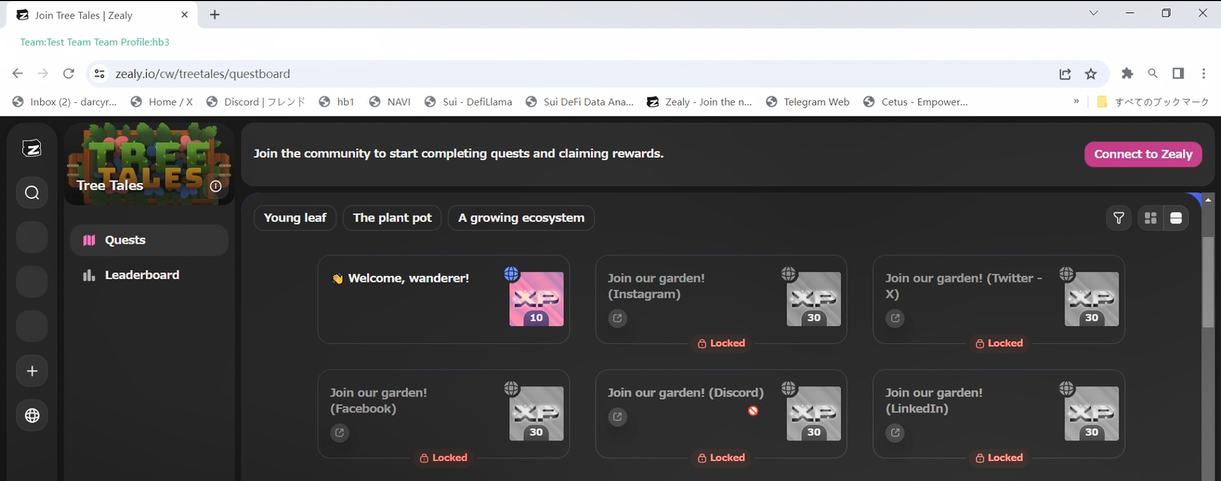
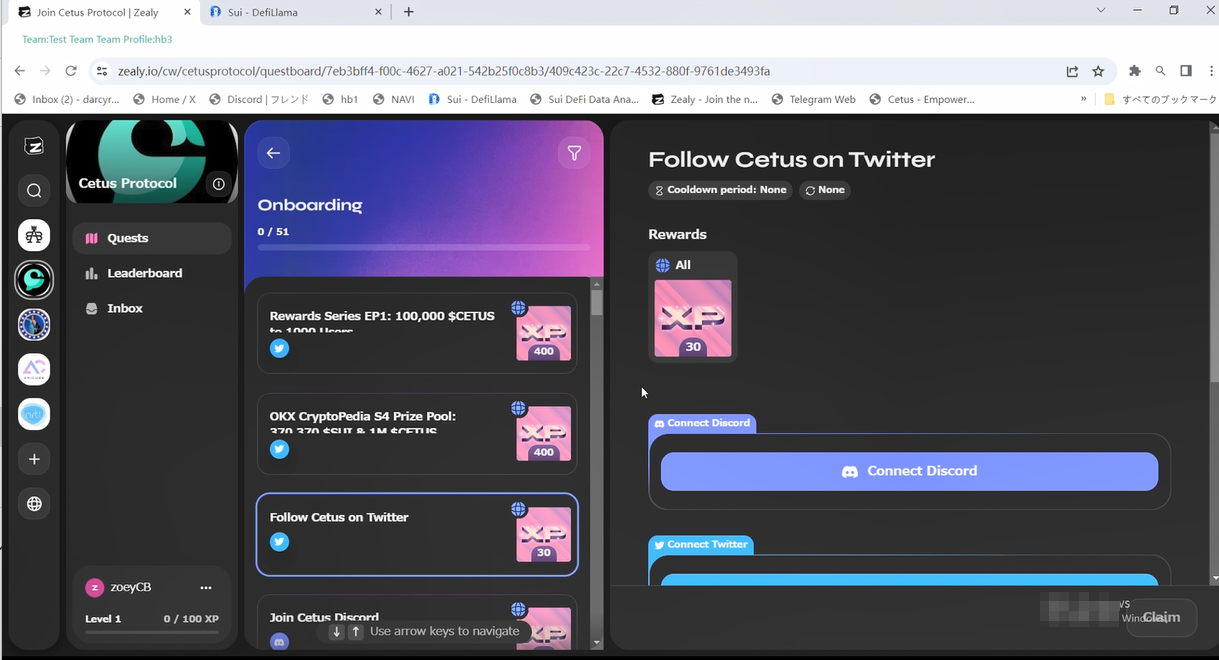
    Once you have the trio set up and well-maintained, your operations in Web3 projects will become much smoother. For instance, when searching for project tasks on Zelay, most of them require interaction through platforms like Twitter or Discord. Simply click on the links, and you will be automatically redirected. Once you enter these platforms, you can claim rewards, complete tasks, and earn experience points.

    In the next artical, we will delve into how to leverage ClonBrowser’s group control feature to efficiently tackle Web3 tasks in bulk.

    Cast a wide net and reel in more fish. ClonBrowser, the anti-detect browser, is your essential tool for monetizing your Web3 ventures.

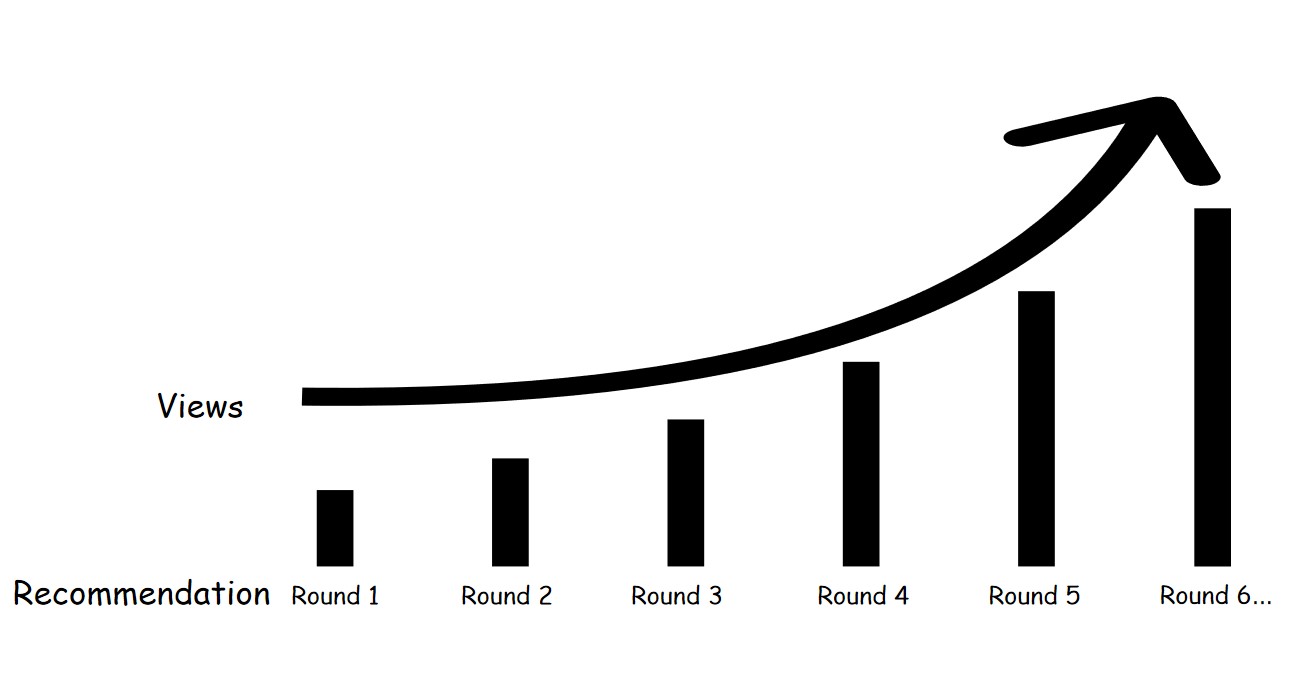
TikTok's recommendation has several rounds, and each round will review your eligibility

TikTok views | Problems and solutions for beginners!

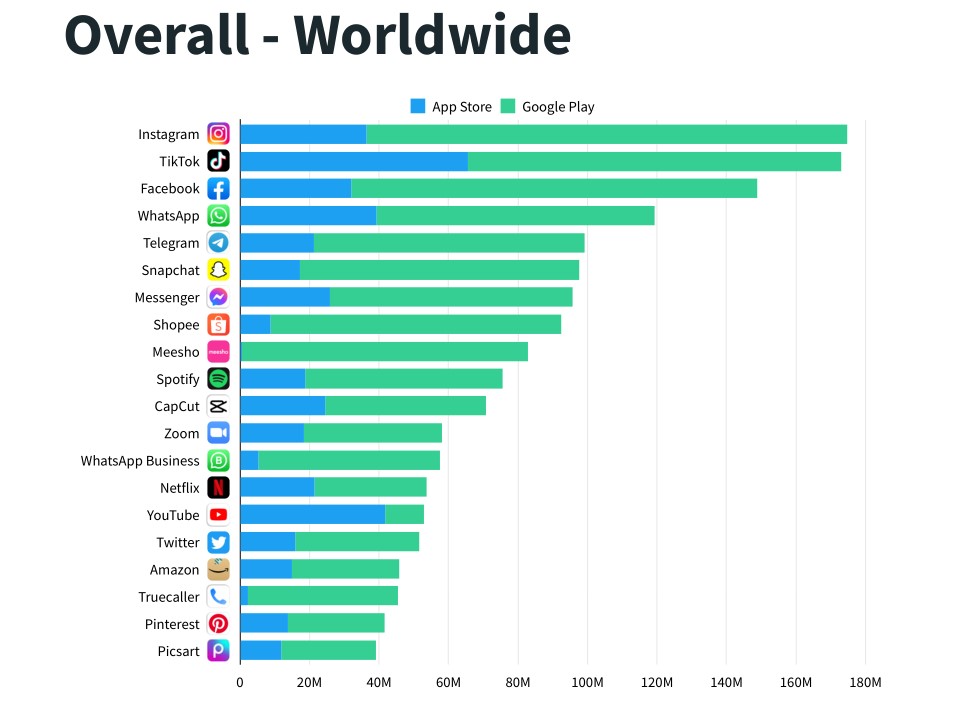
TikTok has become a platform with global influence. According to SensorTower, TikTok is in second place in terms of downloads in Q4 2021. For an app that has just been born, it has a lot of traffic and potential. It may become more expensive to use it for revenue in the future, but for now, TikTok is one of the less expensive options in its class of social networks.According to SensorTower, TikTok is in second place in terms of downloads in Q4 2021.

But some users often stay up all night making videos, and then make a video that doesn’t work as well as a simple video made by someone else. It’s a shame that you’ve been preparing for a long time to gain prestige and money, but end up with nothing.

This article is very suitable for users who are just starting to run TikTok, it will let you know why you are having this problem.

Two common problems when running TikTok

Why are there no views on TikTok videos?

If your account has never had any violations and is a newly registered TikTok account, then after you have posted 20 videos, you can watch some more videos from the foryou page and then watch the video views.

If there has been no viewing volume, then it means that there is a problem with your account running environment. Because even if the quality of the video you made is not good enough, there will be views, just a matter of how many. Because TikTok provides a base of views for each newly released video.

Check if the environment where you are running your TikTok account is insecure. For example, your IP address changes frequently, or you are always logged into the same TikTok account on different devices, or maybe you have multiple TikTok accounts that are linked.

Why is the number of TikTok views not more than 100?

As long as the TikTok account is running in the right environment, then there will definitely be views. But why do you have less than 100 views? This is because the content you create is not high quality enough, and you only get the basic amount of views.

According to TikTok’s algorithmic logic and recommendation mechanism, after you have received the basic views, TikTok will evaluate whether your work is eligible to be recommended again. TikTok’s recommendation has several rounds, and each round will review your eligibility. TikTok system will measure the quality of your work based on the audience’s reaction (number of likes, comments, retweets, followers, full plays) after the first exposure.

It’s like passing a level, you may not even pass the first level, but other people have passed several levels, so other people’s work has more views than yours.TikTok's recommendation has several rounds, and each round will review your eligibility.

How to run a TikTok account effectively?

Ensure a safe TikTok account running environment

Regardless of which platform you are running your account on, ensuring a secure operating environment, protecting your privacy, and preventing account linkage is of paramount importance.

If something is really wrong with your TikTok account environment and you want to make changes, you can use ClonBrowser to maintain it.

ClonBrowser is a multi-configuration browser that protects your privacy and allows you to manage multiple accounts. It is available on both computers and cell phones. Here all the information about your TikTok account is protected so that the outside world can’t peek into this information. And you can manage your multiple TikTok accounts by creating many profiles to simulate different devices without worrying about the occurrence of associations.ClonBrowser

Grow your TikTok account first

For a newly registered TikTok account, don’t rush to place your work first, you need to watch some videos from foryou page, and post your thoughts in the comment section when you see video content you like, so that TikTok will understand your preferences and consider you a friendly account. Of course, in addition to watching videos, you can also watch other people’s live streams.

After developing your TikTok, then start going to upload videos. Remember to space out a few minutes after posting a video, don’t upload many videos at once. During this time you can continue to browse videos from foryou and watch live streams.

Post quality TikTok videos

Most people running TikTok accounts these days edit their videos creatively and use popular background music from TikTok with English titles and tags that correspond to the content. (For more information on how to choose hashtags, check here.) We recommend that you post your video within 6 hours of editing it so that you can reduce some of the repetition rates.

It’s best to have some interactive content in the very first video you post so that you can lead users who watch it to like or comment on your video.

treat a TikTok video as if it were a formal movie

Improve the Quality of TikTok Videos in 3 Ways!

Why do you need to improve the quality of TikTok videos?

TikTok is mainly operated by an American company based in Culver, which is mainly in the short video business, and it is currently one of the hottest short video apps in the world.

The world is currently suffering from an epidemic and most people choose to use TikTok to spend their time. And TikTok is also starting to become a platform for the e-economy, which is a huge opportunity for many people whose income has been reduced due to the epidemic. As long as you can get traffic, then the venture is half successful.TikTok

But what does this have to do with improving the quality of TikTok videos? If you want to answer this question, you need to understand the mechanism of TikTok’s platform.

TikTok’s algorithm is extremely attractive. All TikTok videos, regardless of whether the quality is good or bad, will definitely have views after they are posted. TikTok will assign views to each video based on the algorithm. Then, TikTok will decide whether to recommend your video to more viewers or stop recommending your video based on your detailed data at this stage.

Thus, TikTok’s algorithm gives every user who has the ability to produce quality videos a fair chance to compete with industry luminaries. The fairness that everyone has been seeking is realized in the platform of TikTok. As long as you have high-quality TikTok videos, you may become famous overnight.

So to run TikTok well, it is especially important to improve the quality of your videos. How to improve the quality of TikTok videos? Please read on!

How to improve the quality of TikTok videos?

Accumulate topics and materials

First of all, you need to clarify the image positioning of your account and make precisely targeted videos according to the hobbies of your target user group. Then keep accumulating material for making videos and keep a fixed update frequency.

Anyone who has operated a media account knows that the activity of the account has an important impact on the account weight and the ability to be recommended. And new fans and keep fans active need to have a continuous output of works.

But where do you get the constant inspiration and creative material?

  1. You need to develop the habit of collecting hot events and news and accumulate material on a daily basis.
  2. Observe more stories around you, record valuable things, and use them as material for creating short videos.
  3. Browse more videos of the same type to find what you should learn from them. For example: How they operate TikTok videos? How to make videos to attract user interest? How to write video titles and copy? How to increase the number of user likes and comments?accumulate material on a daily basis.

Optimize the presentation of the video

  • Optimize the material of the video

Besides accumulating creative ideas, you also have to keep optimizing and adjusting the presentation of the video to create a better user experience. For example, choose some recognizable main characters before shooting the video.

  • Optimize the shooting environment

Be very careful in choosing the shooting environment and be flexible in using video effects.

When setting up the shooting scene, try to make it as beautiful as possible. For example, choose some pleasant scenery to increase the beauty of the video.

  • Optimize the details of the video

Pay attention to polishing the details of the shooting. You have to treat a short TikTok video of only 15 seconds as if it were a formal movie.

For very important shots, you have to try to highlight them and make them perfectly detailed so that viewers can quickly find the point of the video in a short time.treat a TikTok video as if it were a formal movie

Be brave and experiment with ideas

Creation itself is – a constant process of trial and error, don’t be afraid to try out new and exciting ideas. For Tiktok, which loves short videos, whoever can show their personality in a limited amount of time will get the views.

Novel ideas will always be able to attract people, so don’t try to find a rule of success that can be copied infinitely.

In fact, although TikTok short videos are already very popular, it has only just emerged in the last few years and everyone is in the figuring out stage. Therefore, you also have to seize this golden time to keep experimenting with the shooting style that suits you. To stand out in this fierce competition, you need to have the courage to challenge yourself and always keep on optimizing and innovating your content.

Being able to create really good TikTok videos is the core of gaining competitiveness and business opportunities.

What is the best tiktok hashtag

TikTok Hashtag? | Use Hashtag to bring Views!

Can hashtag boost TikTok views? How to use hashtags to grow TikTok views? What are the best TikTok hashtags and how do I choose one? Don’t worry, this article will help you to solve these doubts. In this article, you will learn.

  • What is a TikTok hashtag?
  • What is the impact of the TikTok hashtag on viewership?
  • How to use hashtags correctly to bring yourself TikTok views?TikTok hashtag

What is the impact of the TikTok hashtag on the views?

What is the TikTok hashtag?

If we think of the process of getting views as a game of pass pairs, then TikTok video titles, copy, graphics, music, etc. are the active skills we release when we fight a boss, and hashtags are the passive skills.

When we promote our videos we need to tell the TikTok algorithm what this video is about and who we guess will like it. This is what TikTok tags do.

There are two types of TikTok tags: account tags and topic tags. The account tag is the system’s image positioning of your account, and the topic tag is the tag you use when you post your work.

What is the effect of the TikTok hashtag on the views?

The hashtag can be thought of as a keyword in SEO. For example, if you search for a word in Google many search results will appear, but who comes first and who comes second in these search results is determined by the powerful search engine algorithm.

The hashtag is the equivalent of a keyword in TikTok, where a TikTok user is searching for a Hashtag and your video happens to have that tag, then your video will appear in the results for that tag.

If your video has high engagement and buzz, then it will most likely be displayed first. At that point, the hashtag will bring you views from users who searched for and followed the hashtag.the hashtag will bring you views

How to use hashtags correctly to bring yourself TikTok views?

Limitations on hashtags in TikTok

  • The number of hashtags

Currently, TikTok does not explicitly limit the number of hashtags you can add, so you can tag more than one.

  • The Size of the tag range

Using a large range of tags all together is not necessarily a good thing, because if you are still a newbie, but all the tags you post videos with are large range tags, it is likely that the video will be squeezed out by the newly placed competitors after a while.

The best way to do this is to combine large, medium and small range tags. For example, use tags with search results of 1 million, 100,000+, and 10,000 or less at the same time.

As your TikTok account gets more weight and the engagement on your videos grows, you can then use a larger range of hashtags appropriately.

What is the best TikTok hashtag?

How to find the best hashtag for you? What is the best hashtag? Because everyone produces different topics and types of videos, it is hard to say what the best TikTok hashtag is. But there are still some ways to help you get them.

  1. Choose hashtags that are relevant to the video content and have a moderate search volume. Don’t use a lot of hashtags that have nothing to do with your video content just to rub it in. Because this will pull down TikTok’s judgment of your video, thus causing it not to be accurately recommended to people who like this video.
  2. Search for the more popular videos on TikTok, pay attention to the hashtags they use, and combine these with your fans’ preferences, etc.
  3. If you really don’t know what tags to add, you can use tools like Hashtags for Tiktok or Top tags to search for popular tags.What is the best tiktok hashtag

Popular hashtags will give you exposure, but it will also lead to more competition as there will definitely be more videos under the same hashtag. the most popular hashtag on TikTok is # foryou. and it has over a trillion views, so if it’s not a really amazing idea, your video will have a hard time getting views.

make videos

How to post a good TikTok video for newbies?

With the new crown epidemic, the short video app TikTok has surged to become the most visited Internet domain in the world in 2021. TikTok is a social platform that is still thriving and has endless possibilities. So if you just have a TikTok account, how do you post a higher quality video?

In my opinion, you should start with two aspects. One is the quality of the video itself, and the other is the way you set up the video. This can be broken down into the following four issues.

  • The subject of the video
  • Making the video
  • Titles and tags
  • ThumbnailsTikTok

How to publish high-quality videos?

Choose a great video subject

Just like cooking, delicious cooking needs fresh ingredients. The same goes for making videos. If you are struggling with whether originality works well or porting works well, then you can be sure that TikTok encourages originality.

If you have a rich imagination and high enthusiasm, then you can put your own ideas into making videos. Something new and fresh will always get everyone’s attention. But if this is a bit difficult and time-consuming for you, and you are worried that your ideas might not be well received by everyone, then you can also choose to imitate popular video genres.

Please note that imitating their format does not mean that you should copy and plagiarize them, you should put your own unique elements in the video.make videos

Create and publish quality videos

  • Size of the video

The ratio of the video you make is 9:16, which is the most TikTok-friendly size. If you go beyond this ratio, then the limited display area will not show what you want to express, which very much affects the viewership.

If you have a large video, you can use a tool to compress it, such as Arctime. it can reduce the video by 70-80%, but the picture is still very clear. But the disadvantage is that it can only compress one video at a time and it is slow.

  • Length of the video

The maximum length of TikTok videos has been gradually increased from 15 seconds and 60 seconds to 3 minutes. And 2022 will be extended to 10 minutes. But is the longer the video, the better?

No. You should know that TikTok is a short video platform, and a big part of the reason people use TikTok is that it allows many people to use fragmented time to get pleasure.

So, if your account is new, then it is recommended that you keep the video length within 15 seconds, the completion rate is very important. If your account is already through the risk period, then the video length is not as demanding. But even then, I recommend that you don’t exceed one minute. Because more than a minute, the audience may not have patience.use fragmented time to get pleasure

  • Choose the right music

Background music is the highlight of the video, if the popular background music and your video content are highly matched, then the probability of this video being exploded is high.

But this does not mean choosing only good music but matching the rhythm of the content. If your video rhythm is very fast, try to choose powerful music; if it is more lyrical, you can choose soothing music. Generally speaking, there are more application scenarios for rhythmic music because the age of users on the TikTok platform is younger.

You can choose from TikTok’s recommended tracks or go to the music library to search for resources.

This doesn’t mean you can’t import your own music, but if your own video later becomes very popular, it’s likely that many people will engage with it and will increase the exposure of that video. So be sure not to use music that is not licensed. If you can’t tell which music is not licensed, just choose from the music library.

For the recommended music, the platform may have recommendation rules. Many times the music recommended to you matches extremely well with the content of your video. If that’s the case, you can just adopt that music.

It is recommended that when you are browsing through the videos if you come across a more popular soundtrack that is helpful to your creation, bookmark it so that you can use that music in the future.BGM

How to post videos smartly?

Be flexible with titles and tags

Copy descriptions should refine highlights and arguments to increase interactivity as a way to trigger likes, comments, and shares from users. You can also post a message in the comments section yourself to guide users to leave comments after the video is posted.

Use pan tags and precise word tags together. Set up 3-5 Hashtags. if users are actively searching for your video based on the Hashtag, it will increase exposure.

Use attractive covers/thumbnails

The cover of your video is important. After a certain viewer becomes interested in your work or follows you, they are likely to go to your homepage. At this point, if you have a high play count for this video and an attractive cover, it will add a lot of clicks.

So, pick a picture that will attract viewers at a glance. Take a look at this picture yourself first. If you don’t even find it interesting after looking at it yourself, how can it possibly attract fans?

it is very difficult to make a good selection

Facebook| How to find the best product to sell on Facebook?

For those who do e-commerce, Facebook product selection is a very serious issue. If you don’t choose the product well, then no matter how much you promote it, the revenue will not be too good. But it is very difficult to make a good selection because no one can guarantee that the goods you select are what everyone likes.

This article will introduce you to the logic of finding Facebook products and will recommend one of the more commonly used tools for you. Specifically divided into the following points.

  • What is the logic of finding a Facebook product?
  • What are the strategies to find Facebook products?
  • What is Adspy?
  • How to use Adspy?it is very difficult to make a good selection

The logic of finding Facebook products

Go to the Internet and search for Facebook selection methods, the results will tell you that there are thousands of methods. But in fact, the logic of most of the selections is the same. The factors to consider when you make a Facebook selection are:

  • What type of need does this product you’ve selected solve for the user?
  • How was the need found?
  • How is this need validated?

After choosing a better product based on these considerations, package it and then let it generate a premium. The product that can get the most exposure will win.What type of need does this product solve for the user

Strategies to find Facebook products

Focus on the characteristics of the product

When making a Facebook product selection, you can consider three characteristics of the selected items: functionality, applicability, and timeliness.

  1. Functionality: Functionality refers to what the item you select can be used for. Products that are meaningless will not be accepted by users. You can choose a product that you need to use every day, but it should also have certain characteristics. For example, it can be folded, more space-saving.
  2. Applicability: The larger the population to which this product applies, the more potential customers you have. This point should not only be applied to the selection of products but in setting the sales of the target group should also avoid positioning too narrowly.
  3. Timeliness: When it comes to special periods, the selection of ideas can be slightly biased towards current events. For example, at Christmas, you can choose Christmas hangings. Another example is to follow the trend of environmental protection to choose green and safe products.Christmas themed hangings

Pay attention to the life cycle of the product

The life cycle of the product also has a significant impact on the selection of products.

For new Facebook marketplace products, you can choose products that have a sudden increase in recent video plays, or those that have few posts and video footage but can clearly see an upward trend.

If you are more conservative and seek a stable income, you can consider choosing hot products that are already relatively old in seniority. An example would be solar water jets.

If you want to base your product selection on popular Facebook posts, try to choose posts that are relatively new. For example, the creation time in the recent days or within ten days.

Also, the number of likes and comments on the post should be in a more reasonable range. Too high a number indicates that there will be many competitors for this product, or even that they have more money. Although you may be able to gain a little, the high interest is still being gained by the strongest.

If you want to choose a product that has only recently become popular, you have to control your single effectiveness cost. But this is actually more difficult and it is often easy to exceed your mental budget or even lose money.products that have a sudden increase

Follow the rules of Facebook ad

When finding a Facebook product, in addition to those above to think about, you should also pay attention to Facebook’s platform rules. The products you choose should certainly not be prohibited products. The following will list some of the products that are against the rules.

  • Products banned from Facebook: weapons, e-cigarettes, adult products, pharmaceuticals, displaying the inside of the human body, close-ups of body parts, related to orthopedic body contouring, etc.
  • Products that infringe or are patented.
  • Products that do not match the description: products that have a large difference in appearance, or do not have the functions described on the landing page, products that do not match the landing page, and advertising display material in a serious way.
  • Products that are flammable and explosive, plant seeds, or liquid powders over 100ml.Products that are flammable and explosive

What is the Adspy tool?

After reading the above Facebook selection strategy, many people will feel that Facebook selection is very troublesome and want to find a tool to help themselves, then maybe Adspy can help you.

Adspy is a tool for finding Facebook ads database, which is used to find ads of Facebook’s historical and recent hot selling products. For example, filter ads by keywords, Facebook page, product links, store names, website domains, etc.

You can select the keywords you are interested in and search out the products you want to make. You can also view competitors’ products and products that are hot in stores and do product research, etc.search out the products

How to use Adspy?

Let’s have a look at the main interface of Adspy and the options that you will use more often.

  • Site type: You can set the advertising channel, such as Facebook/Instagram/all.
  • Gender: you can set the gender.
  • Ages: Set the age group, usually 18 years old or above.
  • Daily likes: The range is 0-1000+.
  • Total likes: The range is 0-100000+
  • Media type: You can set whether the material type is video or picture.
  • Creat Between: Look at the date the ad was created.
  • Seen Between: See the ads within a certain time period.
  • Countries: this allows you to choose the country of placement.
  • Language: Choose the language of placement.

At the bottom left of Adspy, there is another easy-to-miss element, which is the various emoticons that appear below the ad post when we place an ad. For example, the number of likes, shares, comments, etc. This can also be used as one of the reference contents for product selection.